
Looking for the army button or a Revenge attack after the interface change? Start with Battle at the bottom left. For upgrades and layouts, open Build at the bottom right. Settings is in your Profile. The old shortcuts have moved, so familiar muscle memory can send you to the wrong place.
Where did the buttons go?
| Task | Route from the Home Village |
|---|---|
| Edit army | Battle → Edit Army |
| Battle Log or Revenge | Battle → Battle Log → defense entry |
| Building or Hero upgrade | Build → Buildings & Heroes |
| Troop or spell upgrade | Build → Army Upgrades |
| Equipment or pet upgrade | Build → Hero Equipment / Hero Pets |
| Edit a village layout | Build → hand / Edit Layout at bottom right |
| Clan War or CWL | Chat → Clan chat → war card; dedicated button during war (role exceptions apply) |
| Settings or switch account | Profile (name at top left) → Settings |
Edit your army before attacking
- From the village, tap Battle at the bottom left.
- Choose Edit Army inside the Battle menu and adjust your army there.
- Return to the battle flow when ready. The army review screen also appears before a battle, so check the composition again before committing.
Do not confuse Edit Army with Army Upgrades. Edit Army changes the force you take; Army Upgrades is a Build tab for Laboratory upgrades. Supercell noted that Edit Army can sometimes take a moment to appear on the war map. Its original known-issues list does not establish whether that issue still occurs in your version.
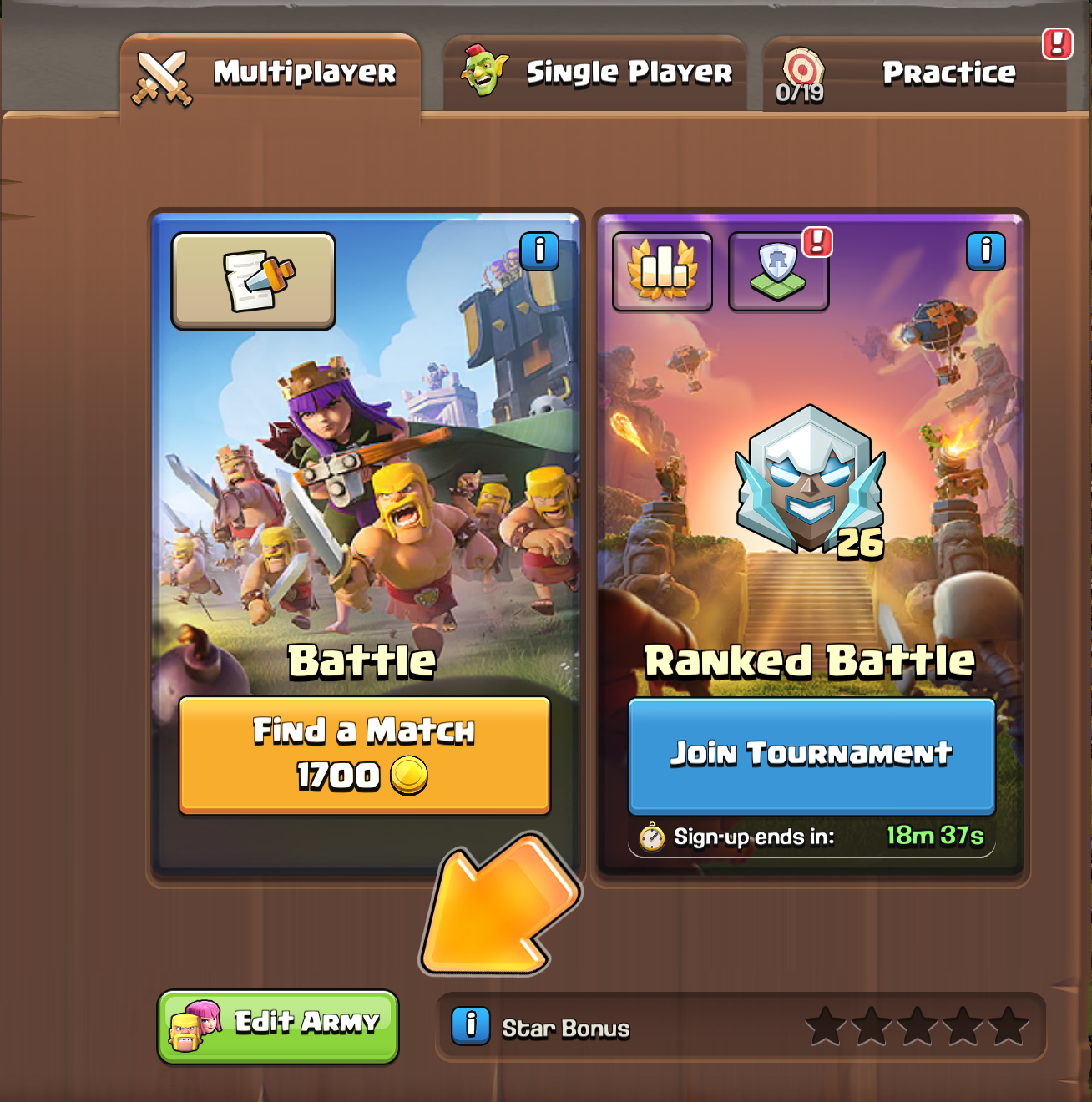
The Battle menu shows the green Edit Army button below the Multiplayer battle cards. Image: Supercell.
Find a defense and Revenge
- Tap Battle, then Battle Log.
- Look through your defense entries and choose an eligible Revenge option if the game offers one.
- Review the target and your army before you attack. Availability can change, so an entry is not a promise that the attack will be possible.
A flaming sword on Battle signals an available Revenge; an eye signals a live replay. Supercell says the corresponding signals also appear on Battle Log inside the menu. If you want to inspect the log, open it rather than relying only on the outside icon. Supercell listed occasional unresponsive log scrolling in its initial known issues, without establishing its present status.
Upgrade buildings, troops, equipment and pets
Tap Build and choose the tab for what you want to improve. Buildings & Heroes includes new buildings and Hero upgrades; Army Upgrades covers Laboratory work; Hero Equipment and Hero Pets have their own tabs. The Builder Apprentice and Lab Assistant are in their relevant tabs.
- Choose the appropriate tab and check the available upgrade cards. Ongoing upgrades normally appear at the top, shortest remaining time first.
- Use the tab’s filters or sort by cost to narrow the list. If something seems missing, check the active filters.
- Tap a card to move the camera to the relevant building and open the upgrade confirmation. Check the cost and requirements before confirming. A locked card points to the building blocking it and explains the requirement.
New buildings are in Buildings & Heroes, not the Shop. In October, Supercell described filters resetting on a fresh session and said it was investigating that behavior. Check your active filters if an upgrade seems missing; behavior may change with game updates.
Open the village layout editor
- Tap Build at the bottom right.
- With the Build menu open, tap the hand / Edit Layout button that appears at the bottom right.
- Choose the layout you want to work on in the editor and review it before applying changes.
The hand is conditional: looking for it on the ordinary village screen before opening Build is easy to miss. The Build menu is also available in Builder Base, where it has two tabs rather than the Home Village’s four.
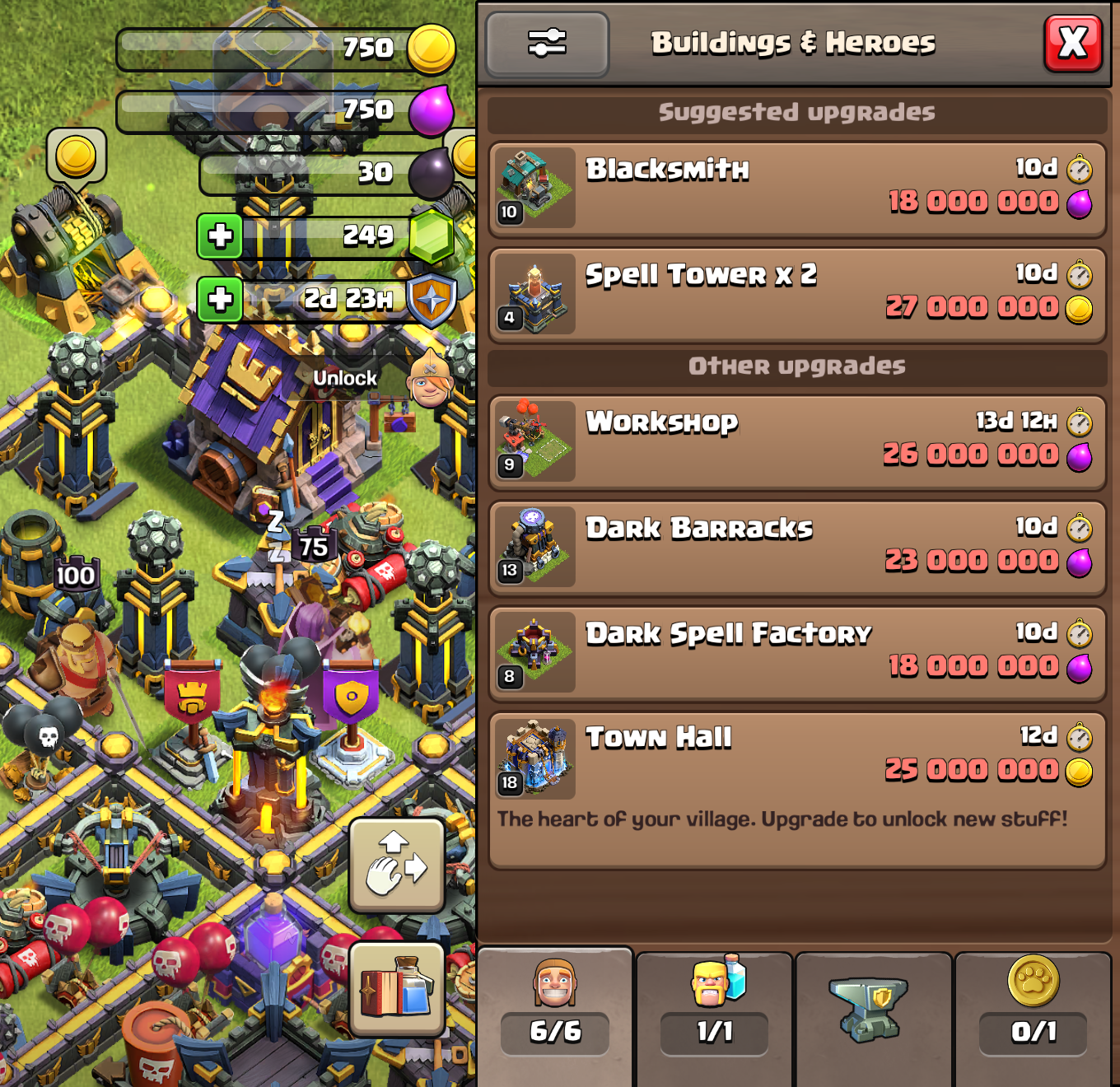
The Buildings & Heroes tab lists upgrades, with the hand-shaped Layout Editor button beside the Build menu. Image: Supercell.
Where did the Clan War button go?
Open Chat, enter Clan chat, and use the Clan Wars or Clan War League card. Supercell says the war card remains available while the clan is searching for an opponent. Once war starts, a dedicated main-screen button returns for clan members, including those not selected for the war; the chat card remains another route to the map.
The official support page qualifies the visibility change for ordinary clan members and says it does not affect Leaders or Co-Leaders. So if your screen differs from a clanmate’s, check your role and war state before assuming the feature is missing. For CWL sign-ups, Supercell also describes a Chat button state; use the Clan chat card to find the relevant screen.
Find Settings, account switching and XP
- Tap your player name / Profile at the top left.
- Open Settings from Profile. Supercell ID and account switching are also reached through Profile → Settings.
- For your XP bar, look in Profile with your personal stats.
What changed after the feedback?
Players complained about additional taps for Revenge and layouts in October 13 community discussions, though reactions were not uniform. On October 15, Supercell acknowledged the extra steps for Revenge, Layout Editor, troop requests and account switching, and said it was reviewing them individually. It was also investigating filter resets and looking into scaling. These were investigations or possible improvements, not confirmed shipping dates.
Supercell said it released a maintenance fix intended to address a misleading Shop “FREE” notification. That was separate from the proposed navigation improvements. The routes above follow Supercell’s published interface guide and support page; labels and visibility can change with later updates.
Sources and visual walkthrough
Supercell: complete interface map
Official October 8 guide, screenshots and full button map.
View Supercell’s interface mapSupercell: Home Village feedback
Official October 15 response on extra taps, filters and XP.
Read Supercell’s feedback updateSupercell Support: What’s New
Official overview of the menus, hand icon and war-button role exception.
Read the support overviewPlayer discussion: extra taps
October 13 community discussion; individual opinions, not a representative survey.
Read the first player discussionPlayer discussion: mixed reactions
October 13 community discussion; individual opinions, not a representative survey.
Read the second player discussion
Latest comments
Log in to join the conversation
Log InNo comments yet. Be the first to share your thoughts!