
A higher Trade Permit does not override local Trade Law. If an Exchange rejects your cargo, first separate the good's legality, the permit recognized by the destination faction, and the destination's demand. Buying another permit only helps when the permit requirement is what you failed.
This is not just an early-game misunderstanding. In an October 2025 discussion, a player could buy restricted cargo but could not unload it, even within their own faction. Trese Brothers explained that different holdings of the same faction can impose different Trade Law.
The examples below explain the documented trading rules, not a test of a current PC or mobile build. They concern ordinary Exchange sales, rather than mission deliveries or modded economies.
Start with the exact good and the actual destination
Select the cargo and read its details. Record its Legality, required Trade Permit level, and the world types that demand it. “Spice” is not a precise enough description when different cargo types have different requirements.
Then check the particular landing zone, not just its quadrant or faction. You need its current Trade Law and owner. Finally, check the sell screen's stated restriction. An illegal-good warning, insufficient permit, unavailable demand and Trade Ban need different responses.
The resource details list where a good is produced and demanded. Use that list to choose candidate buyers before filling your hold, rather than hoping the next port will take everything.
Check 1: the legality number must reach the zone's law
The legal comparison is good's Legality ≥ zone's Trade Law. Equality passes. A higher zone Trade Law is more restrictive, so a good with Legality 6 passes this check at law 6 or below, but fails at law 7.
Do not reverse the comparison. The developer's explanation of legal versus black-market goods explicitly uses legality equal to or above the local law as the legal case. A low legality number is not a license to sell anywhere.
If the destination's law is too high, upgrading your permit will not lower it. Find a suitable buyer with a low enough law, or consider a properly accessible Black Market. Always recheck local conditions on arrival.
Check 2: use the permit recognized by that faction
For a faction Exchange, your recognized permit level must meet or exceed the good's required permit level. A level 2 requirement is satisfied by a recognized level 2, 3 or 4 permit; a level 1 permit is insufficient.
Permits are normally faction-specific. A high permit with one faction does not automatically give you that rank at another faction's Exchange. Independent zones waive the permit requirement, but they still enforce Trade Law.
There is a documented exception: Trade Alliance factions honor one another's permits up to grade 3. Update #171 established that cap. Do not assume an allied grade 4 permit makes grade 4 goods available everywhere. Check the active alliance and the permit recognized at your destination.
Contacts provide Trade Permits. Before paying for an upgrade, confirm that the Contact belongs to the faction you need and offers the required service and level. More permission in the wrong place will not rescue this cargo sale.
Four ports, the same cargo
Imagine a good with Legality 6 and permit requirement 2. These are illustrative values, not a claim about a particular commodity. All four destinations below want the good and have demand; assume no Trade Alliance, Trade Ban or other restriction.
- Port A: law 6, recognized permit 2. Both checks pass. Equality is enough for each.
- Port B: law 7, recognized permit 4. The law check fails. Your best permit does not make this legal.
- Port C: law 5, recognized permit 1. The law check passes, but the permit check fails. Here an appropriate permit upgrade can help.
- Port D: Independent, law 7. No permit is required, but the law check still fails. Independent does not mean lawless.
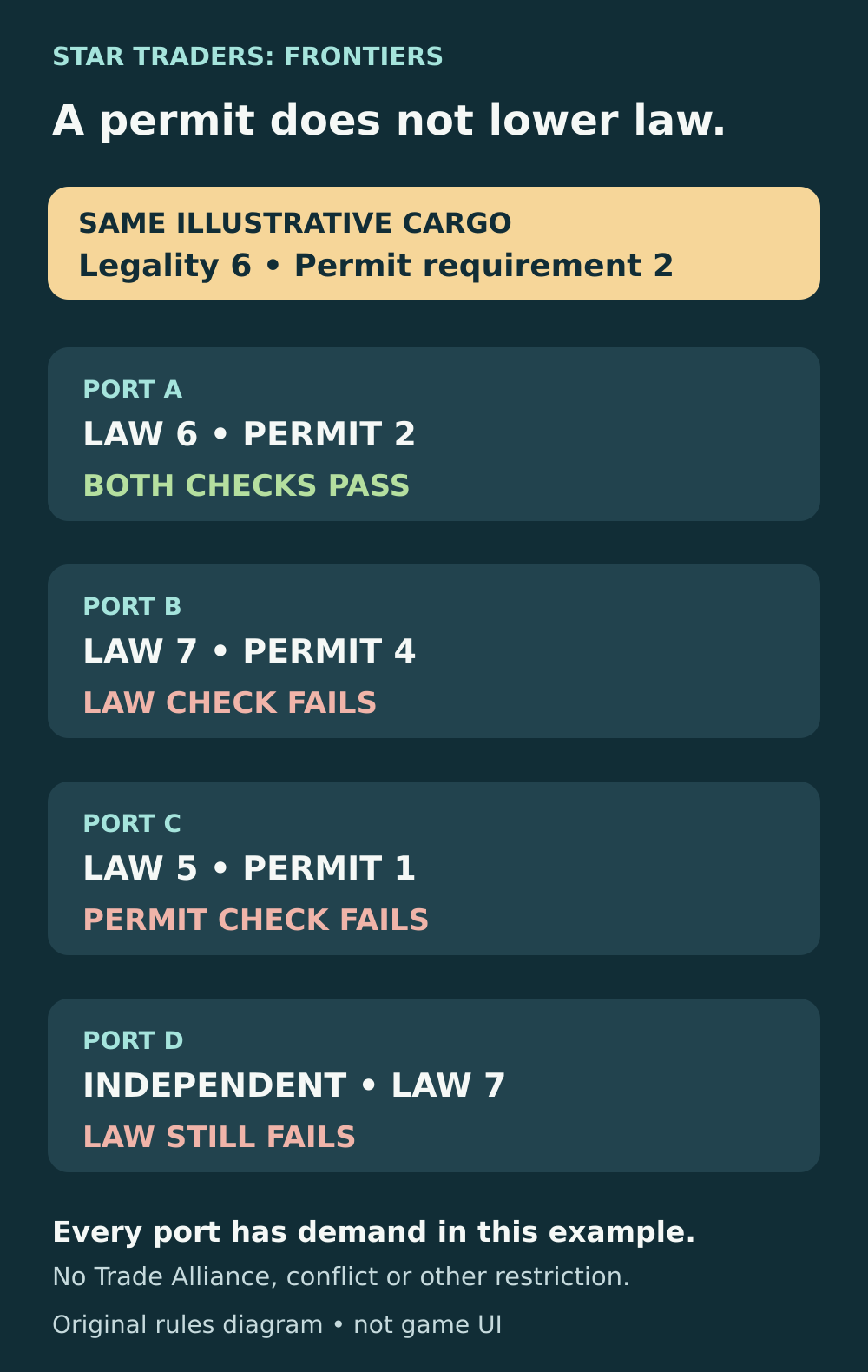
Passing one requirement does not cancel the other. These examples isolate law and permits; actual sales also depend on market conditions and other restrictions.
Check 3: can this Exchange buy it now?
A legal good with a sufficient permit still needs a buyer. Match the good's demanded world types to the destination and check current demand. A place that bought a cargo on an earlier visit may not offer the same opportunity after repeated trading or changing conditions.
The Star Atlas can help find candidates. Its documented cargo searches include “buys crystals” and “sells explosives”; the search takes Trade Law and Rumors into account. Use a “buys” search with your cargo name when looking for a destination, then inspect the result's faction, conditions and market information.
Do not mistake Atlas prices for a live quote. Update #292 changed the Atlas to remember supply and demand from your last visit. The documented freshness window is 21 in-game weeks; afterward it returns to an estimate and warns that the data may be inaccurate. Check the Exchange before committing to the sale.
If the warning names a trade conflict, check its specific rules
Conflicts can add restrictions even after law and permit checks pass. During a Trade War, an Exchange belonging to one side can block manufactured goods branded by the opposing faction. Selling a warring faction's manufactured goods elsewhere may instead cost reputation. A blocked sale and an allowed-but-costly sale are different outcomes.
If the specific warning is Trade Ban – Captain's Faction, check your captain's heritage faction and its conflict with the destination. Trese Brothers confirms that this warning refers to the faction chosen at character creation, not your reputation score. Buying a better permit does not change that heritage.
Read the actual conflict and Exchange warning before selecting another buyer. Do not treat Trade Ban, Trade War and an Embargo Rumor as interchangeable names for one restriction, or assume every permitted trade is free of reputation consequences.
A Black Market is a different route, not a better permit
A Contact who offers Black Market access can provide another way to trade goods blocked by Exchange law. However, that does not mean every Contact or every access attempt opens every cargo tier. Black Markets use their own access levels; the developer's explanation distinguishes unrestricted goods from goods requiring higher access.
If you choose this route, check the Contact's service, the access you actually obtained and the market's demand. Do not count a hypothetical Black Market sale as your guaranteed exit when buying a full hold. A confirmed ordinary buyer is simpler to plan around.
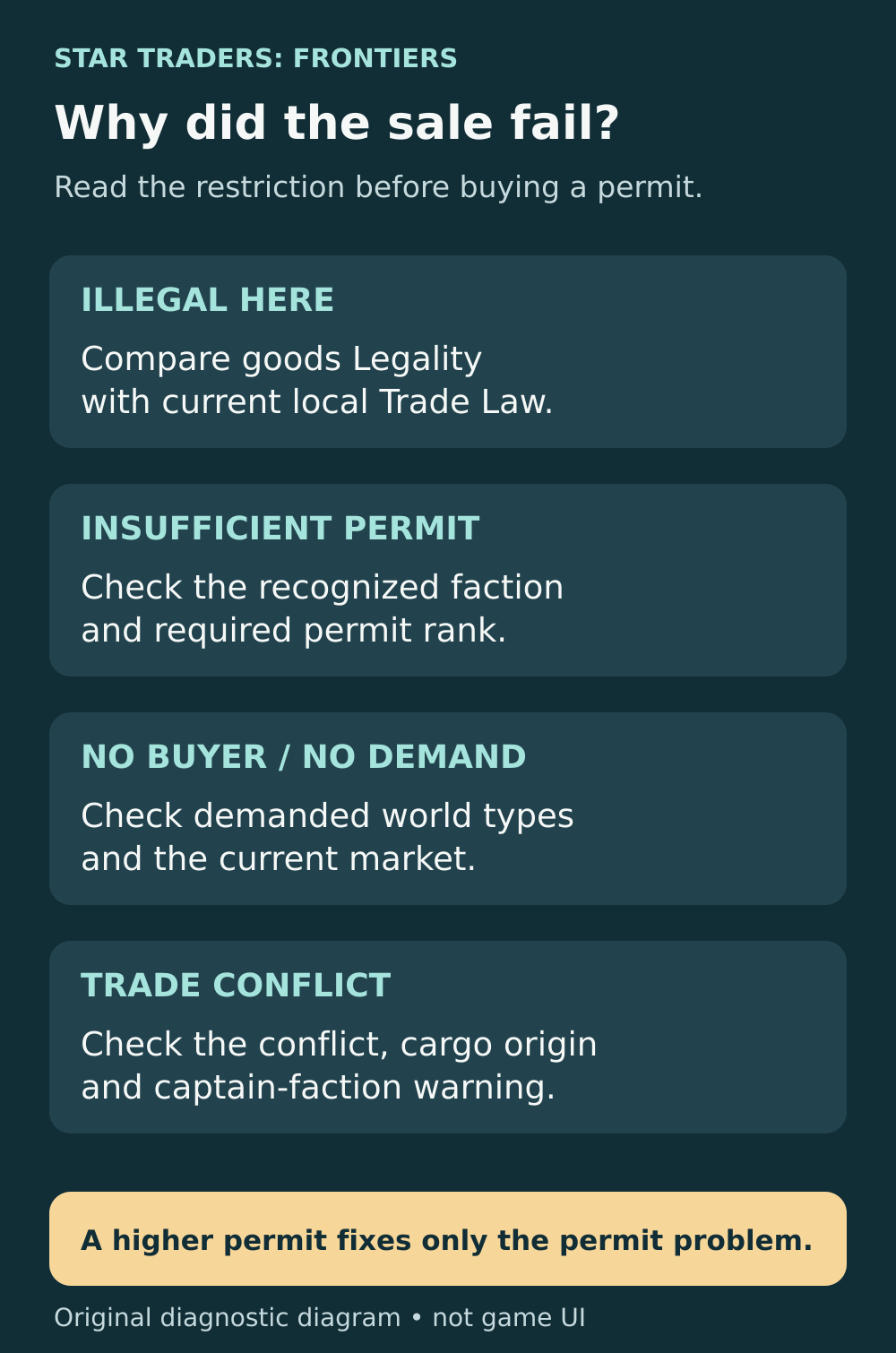
Use the rejection reason to choose the next step. A permit upgrade is a targeted fix, not a universal trading upgrade.
Before buying your next load
- Identify the exact good and its legality and permit requirements.
- Find a destination that demands it, then check its law and faction.
- Verify the permit recognized there, including any active Trade Alliance limit.
- Check current market information, Rumors and conflict warnings.
- Choose a backup buyer and keep enough credits for the trip if the first opportunity disappears.
For cargo already stuck in your hold, work through those checks before buying more permits. If law is the blocker, change the destination or trading route. If the permit is the blocker, obtain the correct faction's required rank. If demand or a conflict is the blocker, solve that problem instead.
Sources and further reading
Developer explanation of local law and cargo demand
Read Trese Brothers’ October 2025 response to a captain unable to sell restricted cargo. It explains different local laws within one faction and the resource demand panel.
Read the sourceDeveloper explanation of the legality threshold
Read the December 2020 developer answer defining legal goods as meeting or exceeding local Trade Law, and explaining Black Market access levels.
Read the sourceCommunity explanation of permits and Independent zones
Read the November 2017 player explanations separating legality from faction permit rank and confirming that Independent zones waive permits but still enforce law.
Read the sourceOfficial Trade Alliance permit rules
Read Update #171, v2.5.77 dated 3 August 2019. The Trade Alliances and Permits section sets recognition of allied permits up to grade 3.
Read the sourceDeveloper explanation of Contact services
Read CoryTrese and Trese Brothers’ August 2018 confirmation that Contacts offer Trade Permits and Black Market access as separate services.
Read the sourceOfficial Star Atlas cargo search
Read Update #174, Merchant’s Delight, in this official August 2019 feed. It documents buys/sells cargo searches and their consideration of Trade Law and Rumors.
Read the sourceOfficial explanation of Atlas market information
Read Update #292, Market Conditions, in this official March 2022 feed. It explains last-visit supply/demand data and the 21-week window before estimates return.
Read the sourceDeveloper explanation of Trade War cargo restrictions
Read the August 2018 developer explanation of faction-branded manufactured cargo in a Trade War, including blocked sales and allowed sales that cost reputation.
Read the sourceDeveloper clarification of the captain-faction warning
Read the August 2018 developer replies identifying Trade Ban – Captain’s Faction as the captain’s heritage faction, rather than current reputation.
Read the source
Latest comments
Log in to join the conversation
Log InNo comments yet. Be the first to share your thoughts!