
If the fingerprints match but the two documents carry different names, read the alias field on the M.O.A. Identity Record before approving entry. A print match does not validate an unlisted second name. Conversely, No known alias is not a reason to refuse someone whose documents already agree on their name.
The useful question is what prompted the test: a name conflict, or a mismatch in the person's appearance? Keep that original discrepancy in mind while checking the result.
Two papers, two checks
Fingerprinting produces a sheet that the entrant fills in and returns, plus the Ministry's identity record. Compare the returned prints with the prints on the record. Reading the printed name alone does not complete that comparison, and merely pressing FINGERPRINT is not a successful test.
Then read the record's name and alias information. The record itself requires the fingerprints and the claimed name or alias to agree. These checks answer related but separate questions: whether the prints fit the recorded identity, and whether the other name on the documents is supported.
You do not need to memorize the shapes of every fingerprint. Use inspection mode to compare the actual print fields. Pay attention to what was selected: a matching pair of names tells you about those names, not about the fingerprint patterns.
Work through a name discrepancy in order
For an ordinary encounter with different names on two documents:
- In inspection mode, select the conflicting names and interrogate the entrant.
- When FINGERPRINT becomes available, use it and give the blank form to the entrant.
- Wait for the completed form to come back, then compare its prints with the identity record.
- Read the record's name and alias entry. Check whether it accounts for the different name you found.
- If the record says No known alias, compare that statement with the conflicting name on the other document, then interrogate the discrepancy.
The final comparison is the step that often gets missed. Repeating the print-to-print check can keep confirming that the prints match while leaving the unsupported name unresolved. The same confusion appears in a player question where approving or denying seemed to produce contradictory results.
Once you have established the identity result, continue with the other checks required that day. Resolving this discrepancy is not permission to ignore an expired document or another entry requirement.
Select the unsupported name, not the matching one
Consider this invented example:
- Passport: Mira Vost.
- Entry Permit: Nina Vost.
- Identity Record: Mira Vost; No known alias.
- Returned fingerprints: match the identity record.
The print comparison succeeds. Comparing Mira Vost on the passport with Mira Vost on the record also succeeds. Neither comparison explains Nina Vost on the permit.
Select the No known alias statement and Nina Vost on the Entry Permit. This is the conflicting pair. A later community discussion describes that same selection, while Pope's June 2013 development log directly confirms that the no-alias statement and a mismatching ID name should be comparable.
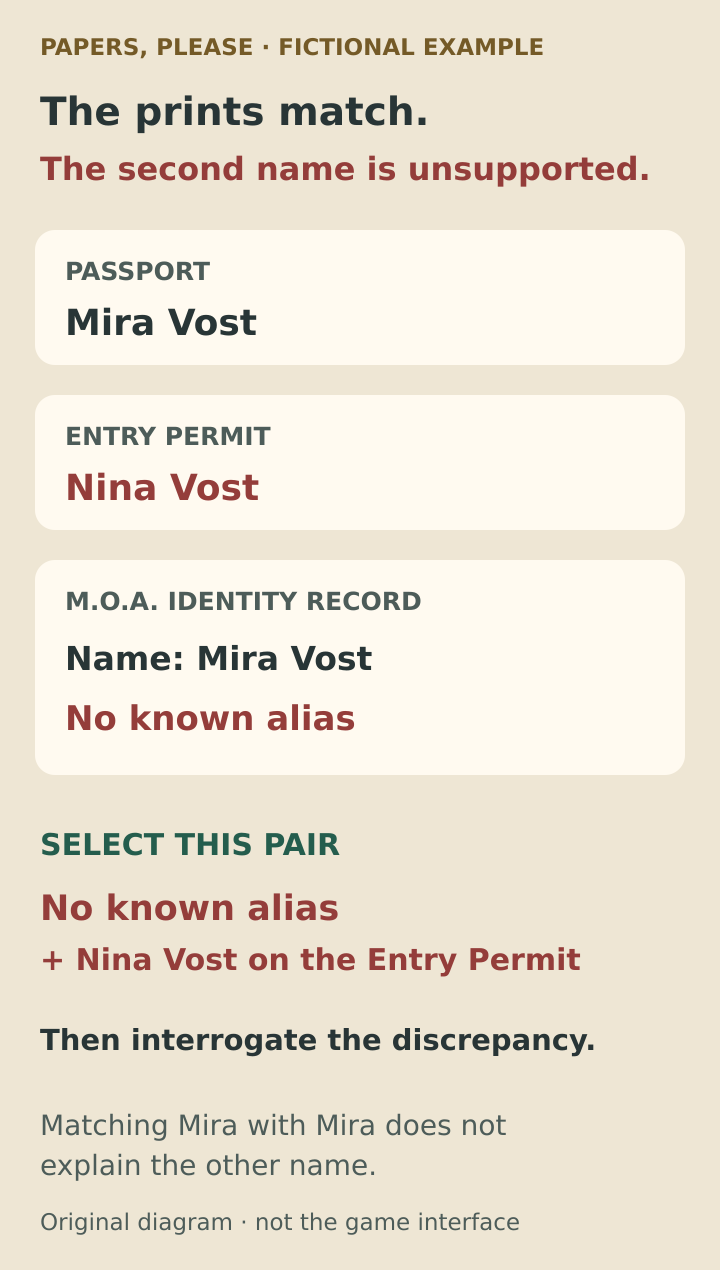
The names are invented. The highlighted pair shows what establishes the remaining name discrepancy, not a reproduction of the game's interface.
If the identity record instead lists Nina Vost as an alias and the prints match, that explains the name difference in this example. Do not deny solely because the two names are different after they have been reconciled.
No known alias can be perfectly normal
Now change the example. Both documents say Mira Vost, but the passport photo looks different from the entrant. You interrogate, obtain the fingerprints and confirm that they match the record. The record lists no alias.
There is no second name to explain. The absence of an alias does not undo the successful identity check. A player who refused an entrant after this combination reported a citation saying the entrant was clear for entry; the reply identified the mistaken assumption that every no-alias result means refusal.
In this photo-mismatch case, the successful fingerprint check can resolve the identity concern. The no-alias line has no conflicting second name to contradict. Continue checking the rest of the paperwork before making the entry decision.
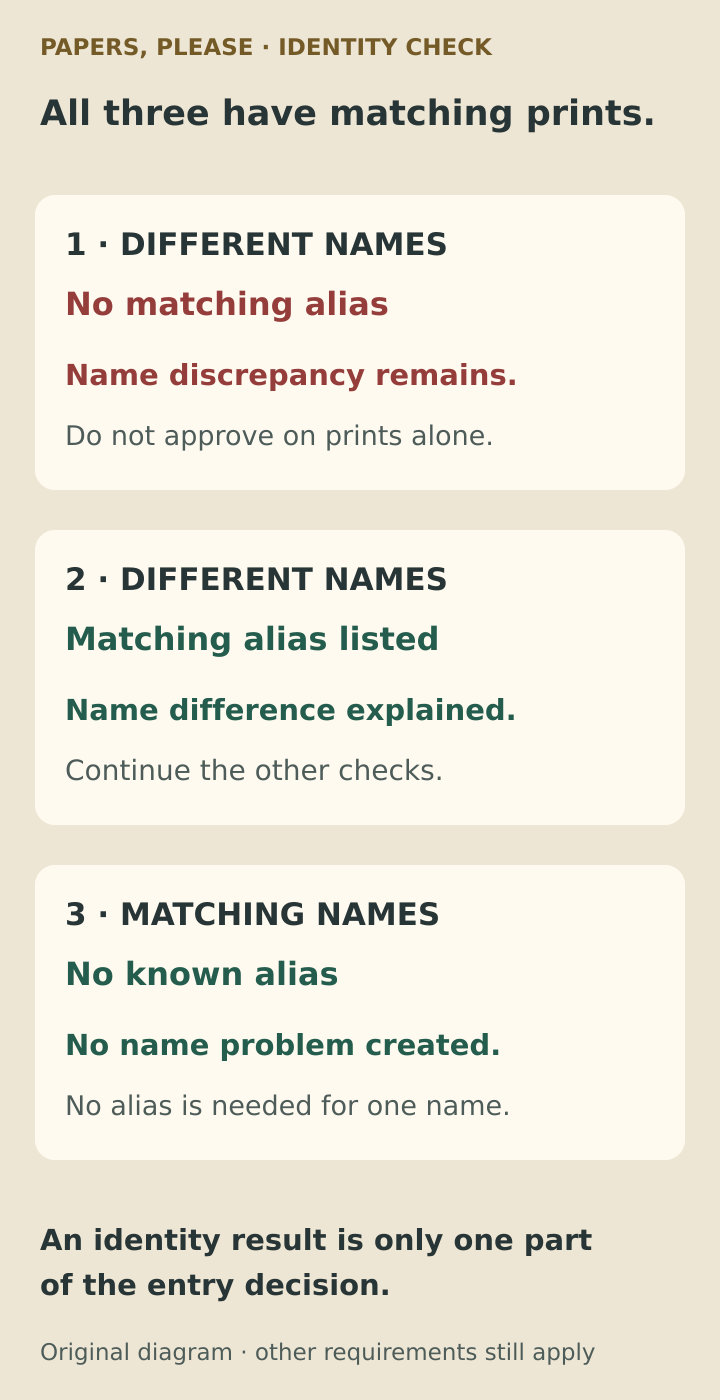
All three cases assume matching fingerprints. The alias field matters when a different name needs an explanation; it is not a standalone admission verdict.
On a phone, compare across the carousel
The phone layout does not require both documents to stay fully visible at once. In the interface described by Lucas Pope for the August 2022 mobile release, you can select a field in inspection mode, scroll to another document and select the second field. Highlighted information remains partly visible while its document moves away.
The FINGERPRINT, SEARCH and DETAIN controls live in a slide-out panel in that layout. It opens when a new action becomes available; if you dismiss it, the flashing lever brings it back. A hidden panel is a different problem from an action that has not been unlocked by the encounter.
Use the document names and selected fields as your reference, rather than copying the screen positions from a desktop video. The tablet-style desk and phone carousel arrange the same paperwork differently.
Denial, detention and the reason stamp
Once an unsupported alias is established, you can refuse entry or use detention when the game offers it. Detention is introduced on Story day 5 and requires the appropriate interrogation; the button is not available merely because you noticed that something looks wrong.
From Story day 18, a refusal also needs the Reason for Denial stamp. The first interrogation activates it. For an ordinary passport refusal, apply both DENIED and the reason stamp. Having the reason stamp available does not force a refusal if subsequent checks resolve the discrepancy: the day's bulletin explicitly permits approval in that situation.
These are separate decisions. First establish whether the name problem remains, then complete the day's required procedure. Do not treat a visible stamp or action button as the final verdict.
If the result still looks wrong
Check the selected fields and the citation's wording before concluding that every fingerprint test is unreliable. An invalid-name citation after matching prints is a reason to revisit the alias entry. An appearance-related citation is a reason to check that you compared the returned prints, rather than only the names.
There have also been real bugs. The official changelog lists fixes for citations involving valid aliases in version 1.0.41, and earlier fixes involving reconciled names on several document types in 1.0.34. An old launch-era complaint may describe a bug that was fixed, not the intended rule.
If you can reproduce a contradiction after checking both the prints and the names, record the game version, day, documents and exact citation. The version appears at the bottom right of the desktop title screen or the mobile settings screen. No current installed build was playtested for this guide, so a reproducible version-specific result should not be dismissed.
Before returning the papers, ask: do the prints match, is every differing name accounted for, and have I completed the remaining checks and stamps? That short sequence prevents both approving an unsupported alias and refusing someone simply because they have no second name.
Sources and further reading
Lucas Pope explains the fingerprint and alias distinction
The developer’s June 2013 posts explain why matching prints can coexist with a false second name, why the returned prints must be compared, and which name/alias fields form the relevant comparison.
Read the sourceThe game's identity-record text and bulletins
The official localization tool contains the identity record’s matching requirements, the No known alias label, and the Story day 5 and day 18 instructions for detention and denial stamps.
Read the sourcePlayer discussion of matching prints and different names
Players work through the case of matching fingerprints with different names on two documents. The replies explain how the recorded alias determines whether that name conflict is resolved.
Read the sourcePlayer report identifying the missing comparison
A player reports an invalid-name citation despite matching fingerprints. Replies identify the comparison between the no-alias statement and the unsupported name on the other document.
Read the sourceWhy a no-alias result does not always mean denial
This player report describes a photo mismatch, matching fingerprints and no alias, followed by an incorrect refusal. It illustrates why the original discrepancy matters.
Read the sourceLucas Pope's explanation of phone inspection controls
The August 2022 mobile development article explains scrolling between highlighted documents in inspection mode and reopening the slide-out panel containing Fingerprint, Search and Detain.
Read the sourceOfficial version changelist
3909’s support changelog records historical valid-alias citation fixes and explains where the version number appears on desktop and mobile.
Read the source
Latest comments
Log in to join the conversation
Log InNo comments yet. Be the first to share your thoughts!