If an OpenTTD train will not upgrade, first find out whether it never reaches a depot or reaches one and leaves unchanged. Those are different problems. Check the replacement rule and its group, send one train for a controlled depot visit, then use the actual failure message before changing settings or selling vehicles.
This guide covers standard OpenTTD replacement mechanics, including the 15.3 release. Android ports can have different controls and older engine versions. NewGRF vehicle sets add their own compatibility rules; JGR Patch Pack template replacement is a separate system.
Start with one train, not the whole fleet
Save the game before changing a working network. Pick one train using the old model and note its group, cargo, orders and current locomotive. Open that group's train list and choose Manage list → Replace vehicles. Select the old model on the left and the intended replacement on the right, then enable the replacement rule. Make sure it covers this train's model and group, including any inherited parent-group rule.
Now send that train to a reachable depot. A normal depot command can leave it stopped inside; a service-only visit lets it return to work. Check its status afterwards rather than assuming that an unchanged or parked train means the replacement failed. On a phone, use the controls your port provides instead of relying on desktop Ctrl-click shortcuts.
- Cannot reach a depot: inspect the route, signals, direction of access and rail type first.
- Reaches the depot but keeps the old model: check rule scope, age restriction and the failure message.
- Replaces successfully but stays inside: check whether the depot command told it to stop.
- Replaces successfully but cannot complete its route: inspect the new engine's infrastructure and consist requirements.
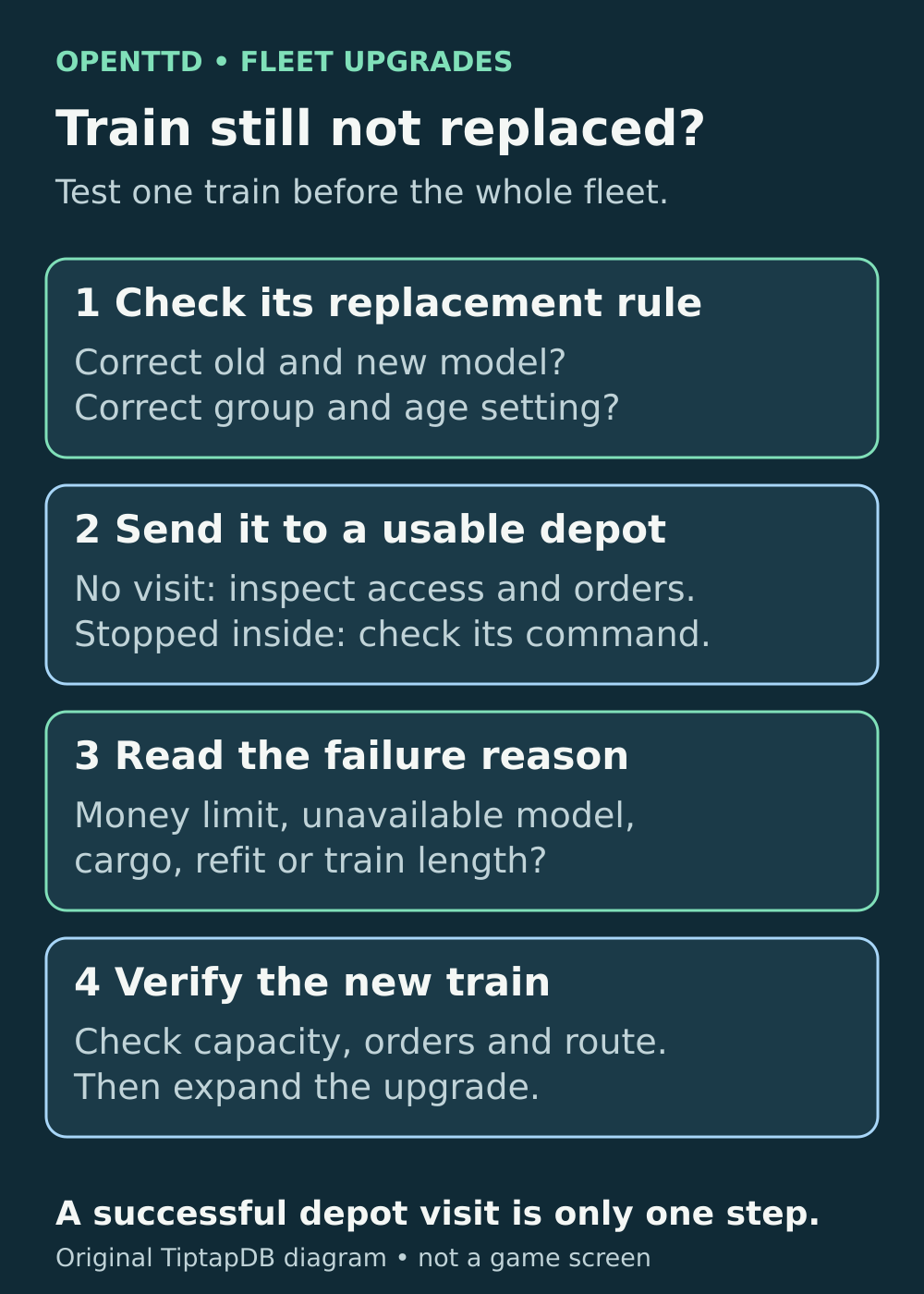
Test one train before sending a whole group to a depot. A rule, a depot visit and a successful return to service are three separate checks.
Autorenew and autoreplace solve different problems
Autorenew replaces an ageing vehicle with a fresh vehicle of the same model, provided that model is still available. Autoreplace is the model-to-model rule used to upgrade a fleet. Switching on age-based renewal does not tell the game which newer locomotive you want.
Check whether your replacement rule is set to replace only old vehicles. A younger train can visit a depot and correctly leave unchanged under that rule. If you want an upgrade before the age threshold, use the immediate replacement choice for the selected old-to-new model pair. It makes eligible vehicles replace on a depot visit; it does not rebuild moving trains on the tracks.
For trains, once a qualifying unit triggers replacement, other configured replacements in the same consist can happen too, even if those units are younger. Review all the rules affecting a multi-engine train before sending it in.
An “Autorenew failed” notification can also be produced by the autoreplace process. Read the reason underneath the headline instead of assuming that the notification refers only to the age-renewal setting.
“Money limit”: check the reserve as well as the purchase price
Open Settings in the running game. Set the category filter to Expert if the option is hidden, then search for autorenew. Look for “Autorenew minimum needed money for renew.” This cash reserve also affects automatic replacement. Use the amount displayed in your game's currency; different currencies can show different numbers for the same underlying reserve.
There are two checks worth separating:
- Can the game send the train for an automatic replacement-related service? When breakdowns are off and ordinary servicing is disabled, the 15.3 code first checks the service interval, then tests pending replacement rules. Its cash test starts with your reserve and adds twice the purchase price of each eligible replacement unit. It does not subtract the old units' sale value in that test.
- Can the replacement be completed inside the depot? The normal arrival process temporarily sets aside the reserve while attempting the replacement. It must still build and, where necessary, refit a valid new train. Refit costs and old-vehicle sale proceeds affect the final transaction. Passing the earlier estimate is not proof that every part of the replacement will work.
For example, with a £100,000 reserve and one eligible £60,000 locomotive replacement, that automatic-service cash check is £220,000: £100,000 + 2 × £60,000. A £190,000 balance falls short even though it exceeds the locomotive's purchase price. This example covers one replacement unit and that specific service check, not a universal final invoice. Extra engines or wagon replacements increase the estimate.
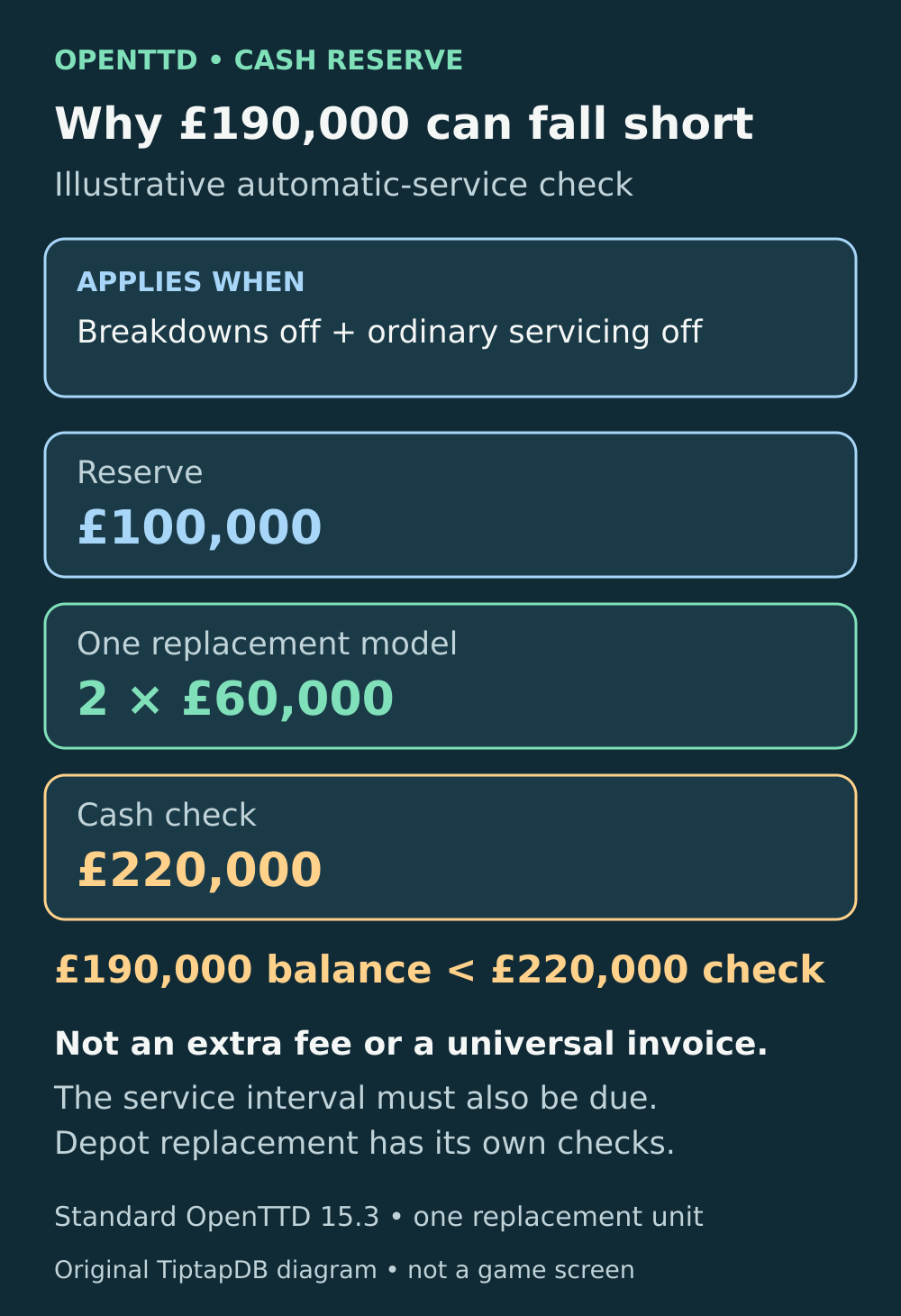
The extra cash check helps explain why a train may not seek replacement automatically. It is not an additional £120,000 fee.
If cash is the blocker, wait for more income, upgrade a smaller group, choose a cheaper model or deliberately lower the reserve. Keep enough for running costs and your next construction work. Setting the reserve to zero does not make a replacement free, make an incompatible engine fit, or guarantee that the whole fleet can be replaced at once.
No depot visit: inspect servicing and orders
An enabled replacement rule is not the same as an immediate order to visit a depot. The train needs a usable route into one. For a quick diagnosis, send the single test train explicitly rather than waiting and repeatedly toggling the rule.
Look through its orders too. A scheduled depot order prevents the train from independently searching for another depot. If that order is conditional, skipped or unreachable, investigate that route. A service-if-needed instruction can also be skipped until the service interval is due.
Do not assume that disabling breakdowns permanently disables automatic replacement visits. Standard 15.3 can still request a service for pending upgrades, but only after the service-interval and eligibility checks. The Android port's published source contains the same reserve-plus-twice-price check. This is why a controlled depot visit is more useful than immediately changing your global breakdown settings.
If your service interval uses a reliability percentage, reliability may not fall with breakdowns and ordinary servicing disabled. The interval test can then prevent an automatic replacement visit. Send the test train explicitly to a suitable depot to separate this timing problem from a failed replacement.
No change in the depot: check group protection and age
Reopen the replacement window from the exact group containing the train. Confirm the old-to-new pair, and check whether its timing is restricted to old vehicles.
Groups can be protected from the replacement rules set for All vehicles. The shield is useful for preserving a heritage steam service while upgrading the rest of the company. If only one group refuses an otherwise successful replacement, inspect that protection before rebuilding track. Protection blocks the All vehicles fallback, not a matching rule assigned to the group or inherited from its parent.
If the game reports that no replacement or renewal rules apply, check the model and timing again. If it reports that the vehicle is unavailable, check whether the intended replacement can still be bought in the current year. An expired model cannot be renewed simply because another example of it already exists on your network.
Electric upgrades need an electric depot and a complete route
For the default rail types, steam or diesel to electric is a supported upgrade when the infrastructure is electrified. Convert the depot as well as the running line. Include the exit, junctions, station tracks, bridges and tunnels the new locomotive must use. An electric main line with an ordinary depot is an incomplete conversion.
Use the depot's purchase list as a practical check: is the replacement available there, and does it match the depot's rail type? Then check the whole route. Being able to build an electric train in one depot does not electrify the next tile outside it.
Default monorail and maglev migrations need a separate conversion plan. Do not expect a conventional-to-maglev selection to perform a track conversion and fleet replacement together. With NewGRF track sets, use that set's compatibility rules rather than assuming every pair behaves like the default rail types.
Cargo, wagon and length errors need a different fix
If the error names an incompatible cargo or a refit order, inspect both the train's present cargo and its orders. A replacement must support the required refits, not merely look suitable in the purchase list. With NewGRFs, engines and wagons may also have restrictions on what can be coupled together. More cash will not resolve those restrictions.
Wagon removal can shorten the consist to accommodate a longer replacement engine. In standard 15.3, its target is the old train's length rounded up to whole tiles. It can sell wagons, so review capacity after the upgrade. It does not add extra carriages when the new engine is shorter, and cannot solve a case where the new engines alone exceed the retained length.
If you switch wagon removal off, check the game's maximum train length and your platforms before proceeding. A longer valid train may still be a poor fit for the route. Test its loading, cargo capacity and journey before applying the rule to the rest of the group.
Finish the test before expanding the upgrade
- Confirm that the test train now has the intended engine and wagons.
- Check cargo capacity and refit orders, especially if wagon removal was enabled.
- Make sure the train has left the depot and completes its normal route.
- Check the remaining cash, then upgrade a manageable group.
- If the test still fails, keep the save and record the exact error, game version, old and new models, rail type and NewGRF set. Those details distinguish a missed setting from a vehicle-set restriction.
Keep the original train until you understand the failure. Repeatedly selling and rebuilding vehicles can hide the real problem while adding unnecessary work.
Sources and further reading
Replacement controls
Open the model-to-model replacement window and choose which vehicles to upgrade.
Read the sourceDepot controls
Distinguish stopping in a depot from a service visit and check the depot controls.
Read the sourceAutorenew settings
Review same-model renewal, age thresholds and the minimum cash setting.
Read the sourceReplacement timing
See how immediate and age-restricted model replacement choices are applied.
Read the sourceReplacement notifications
See why an autoreplace failure can use an Autorenew failed headline.
Read the sourceSettings and currency display
Find the cash-reserve setting used by the company and its currency-aware display.
Read the sourceAutomatic service and payment checks
Compare the automatic-service eligibility check with cash handling at depot arrival.
Read the sourceServicing and depot orders
Check how scheduled depot orders and service intervals affect depot visits.
Read the sourceAndroid servicing logic
Read the Android port’s published service-interval and replacement-reserve logic.
Read the sourceVehicle groups
Check group-specific rules, protected groups and fleet-management controls.
Read the sourceReplacement eligibility
Check model availability and age conditions before a replacement is built.
Read the sourceRail conversion
Plan electrification of tracks, stations and depots without confusing it with replacement.
Read the sourceCargo and consist checks
Review replacement cargo, refit orders, train assembly and wagon-removal checks.
Read the source
Latest comments
Log in to join the conversation
Log InNo comments yet. Be the first to share your thoughts!