
Two portals can share an exit, and a portal that takes you to the right place can still send you somewhere else on the return trip. Minecraft does not give each pair a permanent private connection when you light it. It calculates a destination and looks for a suitable active portal there.
To repair a link, work out the intended destination in both directions, compare nearby alternatives, and improve the placement before removing the old route. This guide covers ordinary Overworld–Nether travel in Minecraft Java Edition 26.3. Bedrock Edition and custom dimension or portal systems can use different rules.
The three rules that explain most mislinks
For Java travel into the Nether, divide the entry X and Z coordinates by eight. For travel into the Overworld, multiply them by eight. Do not scale Y.
The game searches horizontally around the converted destination: up to 16 blocks when the destination is the Nether, or 128 when it is the Overworld. It searches through the available height. Among eligible active portals, proximity is measured in three dimensions, so height can change which one wins.
The coordinates used for travel come from the entering entity, not the decorative center of your obsidian frame. The portal's active blocks matter when selecting a destination. For close competing portals, a coordinate measured at the wrong corner or a different entry position can therefore affect the result.
Calculate a search target, not a decorative frame corner
Use the coordinate order X, Y, Z throughout your notes. Label each entry with its dimension so that you do not accidentally divide a Nether position again.
| Starting position | Calculation | Converted destination |
|---|---|---|
| Overworld: 800, 64, 800 | Divide X and Z by 8; keep Y | Nether: 100, 64, 100 |
| Overworld: 896, 64, 800 | Divide X and Z by 8; keep Y | Nether: 112, 64, 100 |
| Nether: 100, 64, 100 | Multiply X and Z by 8; keep Y | Overworld: 800, 64, 800 |
These are example entry positions and search targets, not instructions to put an obsidian corner on each coordinate. When planning a replacement, place its usable portal opening near the target. A frame corner several blocks above or beside that point is a different location.
For negative coordinates, round down rather than toward zero when converting to a destination block. For example, −401 ÷ 8 is −50.125, which belongs in block −51, not −50. Positive 401 ÷ 8 is 50.125, which belongs in block 50.
This distinction becomes particularly useful when correcting a nearly aligned pair. Do the arithmetic with the signed numbers you actually have; do not discard the minus sign, divide the magnitude and then round as though it were positive.
Why two nearby bases can share one Nether exit
Use the first two rows of the table. The Overworld positions are 96 blocks apart along X, but their Nether targets are only 12 blocks apart.
If the only active Nether portal is near the first target, it can be within the search range for both arrivals. Building a second Overworld portal does not force Minecraft to create another Nether portal when it already finds an eligible one.
The repair is to establish a second Nether opening near the second converted target, then check the return destination from that new opening. With two competing exits, each arrival should have a clearly closer intended option. Do not rely on being barely inside a search limit or on a distance tie.
Treat the full pair as the project. For each base, note:
- Its Overworld entry position and intended Nether target.
- The actual position of the usable Nether opening, including height.
- The Overworld target obtained by multiplying that actual Nether entry position back by eight.
- Other active portals that could compete in either destination area.
The multiplication check is important because the exit Minecraft originally generated may not sit exactly where your arithmetic pointed. Reusing that displaced location without recalculating the return is a common way to preserve the wrong link.
Height can beat a perfect X/Z match
Suppose the converted Nether target is X 100, Y 64, Z 100. There are two eligible candidate portals. For this example, the nearest active block in each portal is:
| Candidate | Nearest active portal block | Difference from target | Squared distance |
|---|---|---|---|
| A | 100, 94, 100 | 30 blocks vertically | 30 × 30 = 900 |
| B | 110, 64, 100 | 10 blocks horizontally | 10 × 10 = 100 |
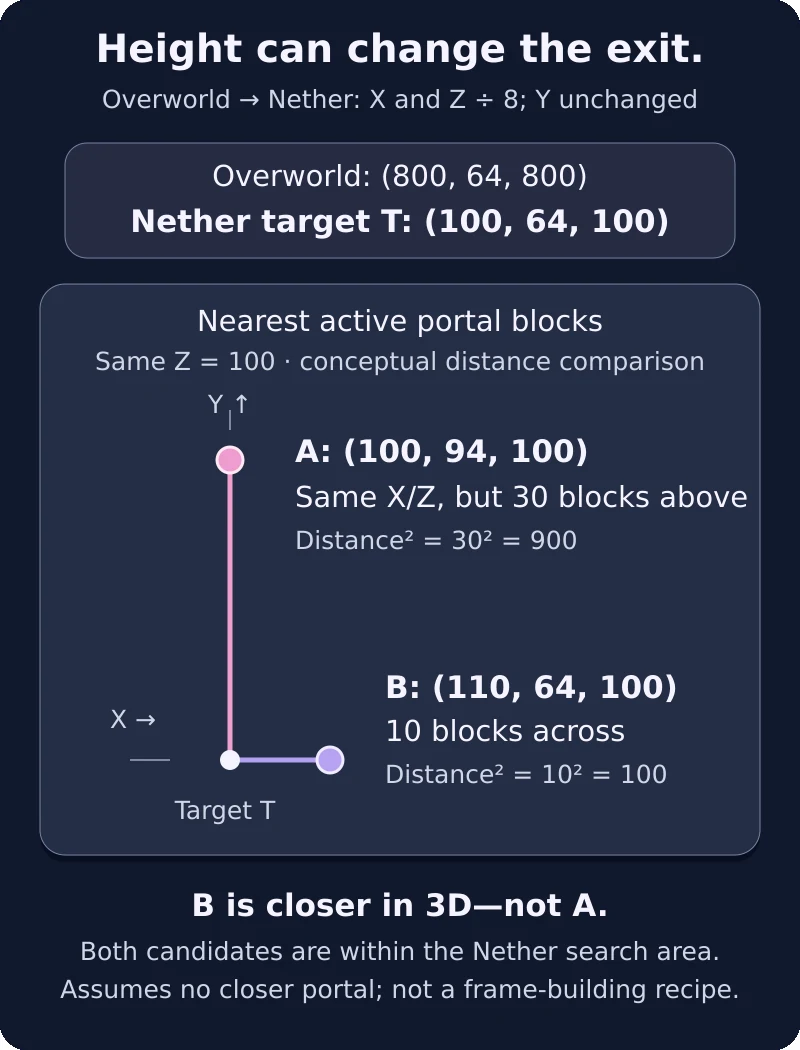
Original coordinate example for Java Edition. Compare the nearest active portal block of each eligible portal, including height: A has squared distance 900, B 100. B is closer in this example, assuming no closer third candidate. These are comparison points, not portal-frame construction coordinates.
Both are within the Nether's horizontal search range. Candidate B is closer in three dimensions even though A has the exact target X and Z. You do not need to calculate square roots to compare 100 with 900.
This is why “Y does not scale” must not become “Y does not matter.” If your intended portal sits far above or below the converted target, a different portal at a similar height may win.
To improve the situation, reduce the intended portal's distance from the target, considering height as well as horizontal placement. Do not force a dangerous excavation simply to match Y exactly. A safe location with a clear distance advantage is preferable to a hazardous exact coordinate or an ambiguous pair of near-equal candidates.
Build the replacement while keeping a working return
Before changing portals, write down the coordinates of the existing Overworld base and the current Nether exit. Keep a route marker or signs along any path between the old and new sites. Take ignition equipment and enough building material to make a safe approach.
A minimal ordinary portal needs ten obsidian when you omit the corners: two blocks along the bottom, two along the top, and three up each side. The opening is two blocks wide and three high. Bring the material you need for the new frame before dismantling anything.
Use this repair sequence:
- Calculate the intended Nether target from the Overworld entry. Inspect the target area and locate nearby active alternatives before deciding where the replacement opening should go.
- Make a safe platform and approach around the chosen location. Aim for an opening close to the converted coordinates, with a height that does not hand the advantage to a competing portal.
- Build and light the replacement while leaving the old route available. If the new opening is displaced from the target for safety, calculate its return target from its actual location.
- Travel through the replacement toward the Overworld. Confirm which base or portal it reaches, and record any unexpected newly generated exit.
- Enter the intended Overworld portal and check the outbound journey too. Use the part of the opening you normally walk through, rather than assuming a successful trip from one edge proves every wide opening behaves identically.
- Only after the intended route works both ways should you retire an unwanted portal. Keep ignition equipment and a known way to reach the working opening during that change.
If the old portal is still attracting travel, improve the intended portal's placement first. Deactivating the competitor can be part of the repair, but only when you have established safe access to the replacement. Removing your only usable exit before building the other one turns a linking problem into a navigation problem.
Diagnose the result of each test
A portal test gives a specific clue. Use it to decide what to change rather than rebuilding the entire network at once.
Minecraft creates another portal
An automatically created exit indicates that the travel did not select an existing active destination. Check whether the intended opening was active and within the destination-side search area, and whether you used the correct dimension in the calculation.
Do not immediately adopt the new frame as the final answer. Its actual location is now another fact to account for. Record it, establish a safe route, and compare it with the planned destination before deciding which opening to keep.
A portal stops working after the area is damaged
First distinguish an inactive opening from a wrong destination. Relight an intact intended frame when it is safe to do so, then retest. Coordinate changes are not the first repair for an opening that is no longer active.
Protect vulnerable approaches and keep spare ignition equipment available. A portal network should remain usable after you have finished the arithmetic, not depend on an exposed opening being left undisturbed forever.
Keep a small portal map as the network grows
For each destination, keep the Overworld entry, Nether opening and height in one row of a note or sign system. Add another row when you create a replacement rather than overwriting the only record of the old exit before the new route is proven.
When a new portal changes an older route, compare it against the older route's converted target. The new frame may simply be a closer candidate. Repair that competition deliberately: reposition the intended opening, improve its height alignment, or retire the redundant one after preserving access.
The goal is not merely to make two portals light up. It is to give each journey a clear intended destination and a reliable way back.
Latest comments
Log in to join the conversation
Log InNo comments yet. Be the first to share your thoughts!