
An Additive Reconstructor needs a tier-one unit to upgrade, not just materials and power. If yours is full of silicon and graphite but produces nothing, first check what the factory is sending, which way it faces, and whether the upgraded unit is researched.
This guide covers the standard Serpulo production chain in Mindustry v8, using Build 160.7. Erekir fabricators, higher-tier reconstructors and modded recipes have different requirements.
Start with a simple Dagger-to-Mace line
Use one Ground Factory feeding one Additive Reconstructor. Keep their centers aligned and place them directly beside one another, with both outputs pointing along the same line. The factory sends its Dagger into the reconstructor's rear; the reconstructor sends the completed Mace onward.
- Research the Mace in the campaign tech tree. Owning the reconstructor building alone is not enough.
- Select Dagger in the Ground Factory. Supply that factory with lead and silicon.
- Aim the factory's output into the reconstructor. Do not aim the reconstructor's own output back toward the factory.
- Supply the Additive Reconstructor separately with silicon and graphite, and connect both buildings to power.
- Leave a clear, suitable exit beyond the reconstructor. Do not put a wall or another solid obstruction there.
- Let the game run and watch one unit move through the entire chain before expanding it.
A direct connection is enough. If the buildings are farther apart, use a properly aligned payload route. Ordinary item conveyors deliver materials; they do not transport the unit itself.
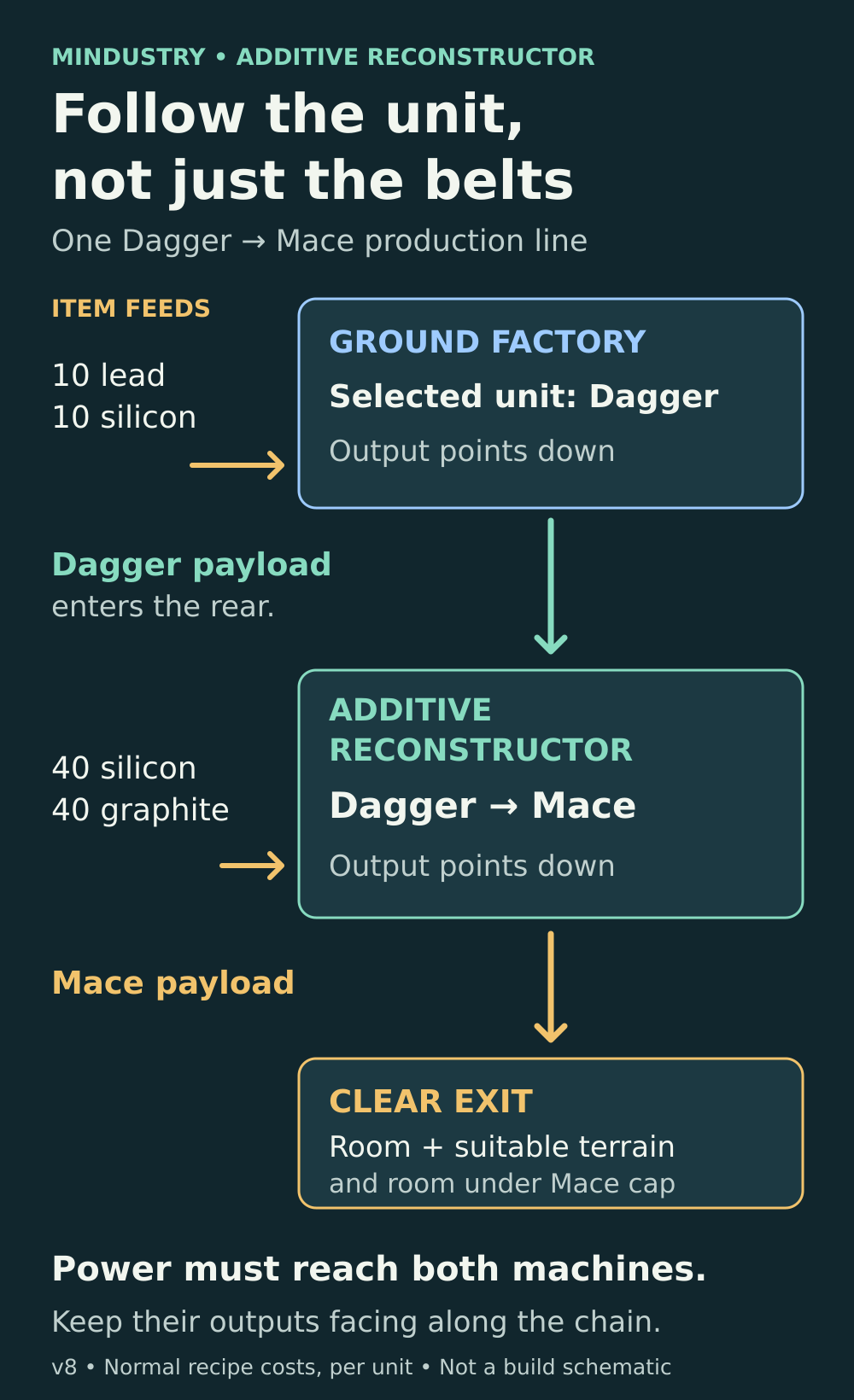
Follow the unit's path: factory output, reconstructor input, then a clear deployment area. The material feeds are separate from the payload route.
Watch where the chain stops
The visible stopping point tells you which check matters:
- The factory is empty and its progress does not advance: inspect its selected unit, material supply and power first.
- A Dagger or Mono waits outside the reconstructor: inspect the connection, receiving side and research for its upgraded form.
- The correct tier-one unit is inside but the upgrade does not progress: inspect the reconstructor's own resources, power and enabled state.
- A completed Mace or Poly is stuck at the exit: inspect deployment space and that unit type's cap before adding more production.
- The line works, then the reconstructor sits empty between units: compare the factory's build time with the shorter upgrade time.
Change one thing at a time. Otherwise, fixing the rotation and rebuilding the power network together makes it difficult to tell which problem you actually solved.
Check the input unit and both output directions
The Additive Reconstructor converts a supported tier-one unit into its tier-two counterpart. Two useful examples are Dagger to Mace and Mono to Poly. For Polys, use an Air Factory set to Mono; feeding it Flares produces Horizons instead. There is no Poly recipe to select in the Air Factory.
Select the factory and confirm the unit it is actually building. A factory can be working perfectly while producing the wrong input for your intended army.
Next, follow the output direction of each block. The reconstructor accepts an eligible payload from its non-output sides, but not through its own output face. A factory pointing away from the reconstructor will release or route its unit elsewhere. If your Mono-to-Poly setup works but the Dagger-to-Mace setup does not, check the Ground Factory's orientation independently.
Do not assume an already deployed unit walking beside the building is being supplied as a payload. A factory-to-reconstructor connection is the simplest way to verify the production chain before experimenting with manual unit loading.
A red tree symbol means the upgrade is not researched
In campaign, the reconstructor checks the research for the unit it would produce. When that upgrade is locked, it can reject the incoming payload and show a red tech-tree symbol above it.
For a Mono, check Poly research. For a Dagger, check Mace research. Researching the building and the tier-one unit does not automatically unlock every tier-two result. Fix this in the tech tree rather than adding more graphite or rotating a correctly connected factory.
Feed the factory and reconstructor separately
Under normal, unmodified rules, each Additive upgrade consumes 40 silicon and 40 graphite. The building uses 180 power per second while working and needs 10 seconds of processing at full speed. This tier does not require cryofluid.
Those upgrade costs are additional to the cost of the input unit:
- Dagger: the Ground Factory consumes 10 silicon and 10 lead. One complete Mace chain therefore uses 50 silicon, 10 lead and 40 graphite.
- Mono: the Air Factory consumes 30 silicon and 15 lead. One complete Poly chain therefore uses 70 silicon, 15 lead and 40 graphite.
These are production costs per unit, not the materials needed to construct the buildings. Campaign settings, custom rules and mods can change costs or speed.
Check the stock inside each machine, not just the items passing nearby. A silicon belt can feed the first building while leaving the second short. Likewise, power reaching the factory does not prove the reconstructor is connected to the same working network. If power satisfaction is low, address the supply problem before adding more factories.
Fix the power supply before scaling up
Check the generation deficit and connected network before adding more factories or batteries.
Read the power guideAn empty reconstructor may simply be waiting
At normal speed, a Dagger takes 15 seconds to build and a Mono takes 35 seconds. The Additive Reconstructor needs only 10 seconds for either upgrade. One Air Factory therefore cannot keep its reconstructor continuously busy producing Polys, even with perfect power and resources.
The 10-second figure describes reconstruction, not the time needed to make a new Poly from raw materials. Payload movement and unloading add time, too. An idle period after each successful upgrade is not evidence of a fault.
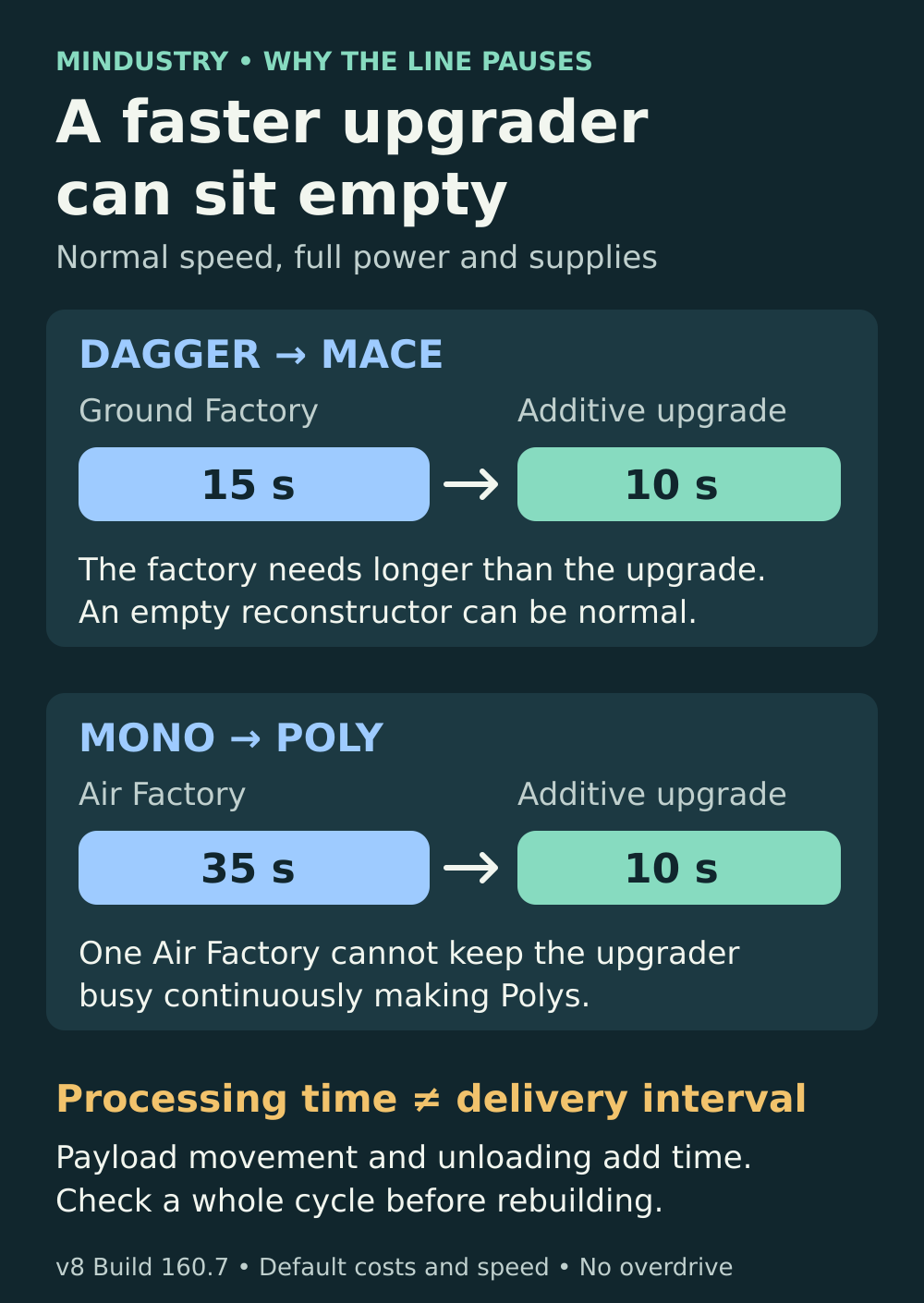
These are individual machine processing times. They are not exact delivery intervals or a promise of an immediately available unit.
A finished unit can be blocked from leaving
Once the upgrade is complete, more silicon does not solve an obstructed exit. Check the space in front of the output and move nearby ground units away if they are crowding the deployment area. Ground units need suitable terrain and room to appear; a receiving payload block must be able to accept the unit.
Also check the unit-cap warning. Mindustry's cap is checked by unit type, so the Mace count and Poly count are separate. A full Mace cap does not mean every other unit type is full. Under standard rules, a larger Serpulo core raises the cap; custom maps and servers may use different limits.
The important distinction is that the cap can prevent a completed payload from deploying. In this standard chain, the cap is checked when releasing the unit into the world, not while processing its payload. Once the blocked unit occupies the output, the line backs up behind it. Moving deployed units away can clear a physical obstruction, but does not free their cap slots. Building another identical line will not raise the cap or clear the obstruction.
If a simple line still fails
Check whether a logic processor has disabled a building, and note any inactive-factory message. Some map and team rules delay factory activation from the start of a map. Compare the rules of the sector or server with normal campaign rules before treating different behavior as a bug.
For a useful help request, include the game build, campaign planet, selected factory unit, intended upgrade and a screenshot showing the entire line with its power and material feeds. Capture the warning symbol or the exact point where a payload stops. Mention mods, custom rules and whether it happens in single-player or multiplayer.
Do not abandon the sector or erase a save to troubleshoot one production line. Start by confirming a researched unit, a correctly directed payload connection, sufficient inputs, a clear exit and room under the upgraded unit's cap.
Sources and game version
The mechanics above follow the official Mindustry v8 Build 160.7 source. Custom rules, mods and other versions can differ. The links below open the relevant game code and text.
Mindustry v8 Build 160.7
The official release used for this guide was published on 8 October 2026.
View the official releaseHow payloads move between buildings
The game routes a payload through the output direction and checks the receiving building.
View official source codeFactory recipes and Additive upgrades
The standard unit recipes, tier-two upgrade pairs and processing times used in this guide.
View official source codeReconstructor inputs and research
The receiving-side and researched-upgrade checks, followed by the upgrade process.
View official source codeWhat the red tree symbol means
The in-game help text explains that the upgraded unit must be researched.
View the official game textFactory selection and progress
The factory produces its selected tier-one unit and routes the completed payload onward.
View official source codeWhy a completed unit cannot deploy
The game checks the unit cap, suitable terrain and nearby-unit overlap before deployment.
View official source codeUnit caps are checked by type
The deployment check compares the number of that unit type against the team’s current cap.
View official source codeSpecial factory activation rules
Custom team rules can delay factory activation from the start of a map.
View official source code
Latest comments
Log in to join the conversation
Log InNo comments yet. Be the first to share your thoughts!