
Your Launch Pads fire, but the destination gets nothing. Or six pads should export 1,200 items per minute, while the receiver reports only 100/min. In Mindustry v8, those are different problems.
Start with one resource and trace it through four checks: actual launches, recorded exports, a ready Landing Pad, and an open route out of that pad. Building more receivers cannot repair a missing export rate.
This guide covers the standard Serpulo campaign with the new Launch Pads, checked against Mindustry v160.7 on November 5, 2026. Legacy Launch Pads, mods and custom-map rules can behave differently. The mechanics below were checked in the official release source; this is not a claim of a live gameplay test. In multiplayer, have the host perform the sector-map, routing and import-readout checks; clients do not see all of those controls or readouts.
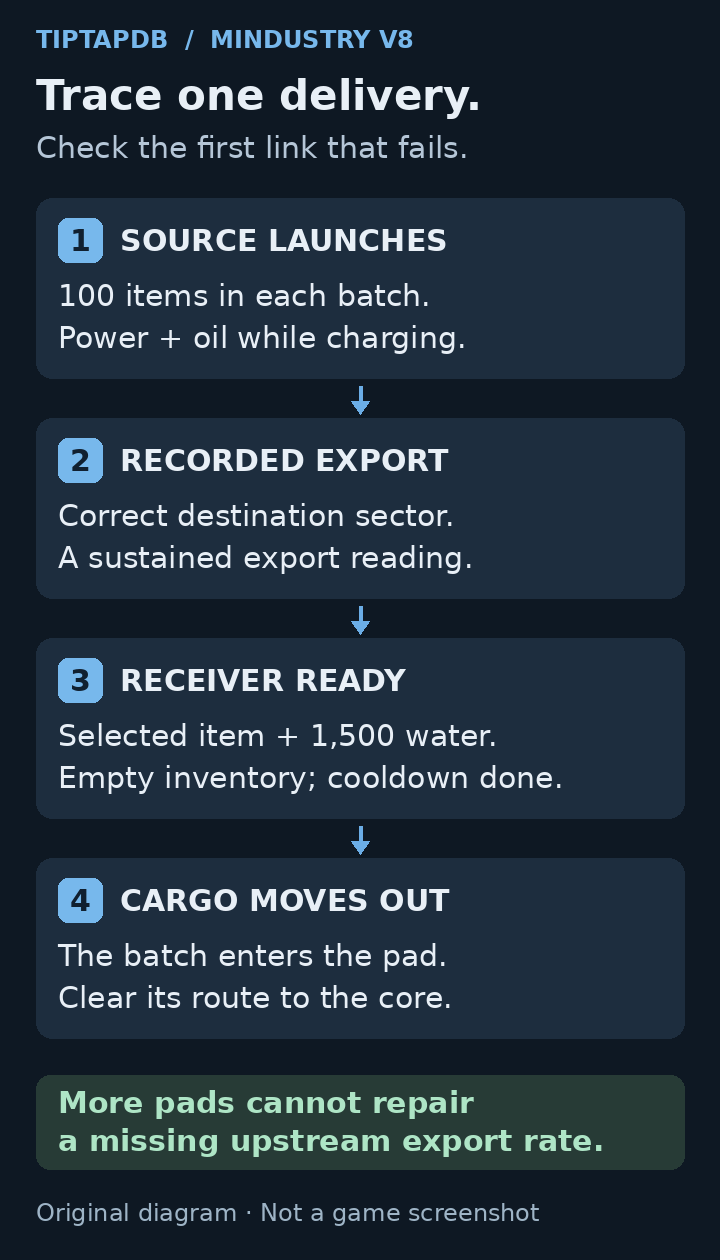
Four checks for a missing Mindustry delivery: actual launches, recorded exports, a ready Landing Pad, and an empty output route. Original TiptapDB diagnostic diagram. It is not a screenshot or a build schematic.
First, identify where the delivery stops
Use the symptom to choose your starting point:
- The source pad never fires: check its item batch, power and oil.
- The destination shows no sources or a surprisingly low Max Total Import: check the destination setting and the source sector's recorded export.
- Import capacity is positive, but no batch lands: check the selected item, water reserve, remaining inventory and cooldown at the Landing Pad.
- Batches land, but your core stock does not increase: follow the output belt. The cargo arrives in the pad, not directly in the core.
In the new system, the destination needs a Landing Pad configured for the resource. A Launch Pad's animation alone does not prove that the receiving setup works.
1. Prove that the source actually exports
Visit the source sector and inspect one feeder and its Launch Pad.
The standard new pad holds 100 items of one type. An empty pad accepts its first item type, then rejects other types while that batch remains inside. You do not select its resource in the same way you configure a Landing Pad. Feed it a clean, single-resource line.
At normal speed, without boosts, a fully supplied pad can launch one 100-item batch every 30 seconds: 200 items per minute. Its operating inputs are 480 power per second and 9 oil per second while charging. These are design requirements, not proof that your particular pad is receiving them.
Watch for a real launch, then another. If the pad is stuck below 100 items, fix the feeder. If charging stalls, inspect power and oil. For a grid that runs only until its batteries empty, use our Mindustry power-deficit guide.
Also inspect the pad's destination. Make sure it is a different sector with an existing base, not none (sun). All Launch Pads in one sector share that sector's destination. Changing the destination through one pad does not create an independent route for that pad alone.
2. Check recorded exports, not the number of buildings
Six unboosted pads have a combined design ceiling of 1,200 items/min. That does not mean the campaign has recorded 1,200 items/min of usable exports.
Mindustry records actual export events and averages samples. In v160.7, the export measurement uses a 60-sample window, with a sample every 60 ticks, approximately one game-second at normal speed. Supply interruptions, recently started production and core withdrawals can affect the recorded result.
After repairing a feeder or expanding production:
- Stay in the source sector with the game unpaused.
- Confirm that repeated launches continue without starving the production line.
- Open Planet Map (N by default on desktop, or menu → Planet Map on mobile), select the source sector, then choose Stats. Check your item's rate under Export.
- Close Stats and Planet Map, make sure the game is running, and let further batches launch. Reopen Stats to compare readings.
- Leave when repeated readings are reasonably steady and match what the line is sustaining.
There is no universal “wait five minutes” fix. A steady export reading is more useful than a timer. Also check whether the line is quietly draining a stockpile instead of being replenished by production.
At the destination, Max Total Import is the sum of recorded upstream exports of the selected resource from sectors currently directed here. It is not the receiving pad's personal capacity, and it does not guarantee that cargo is reaching the core.
What does 100/min actually mean?
Suppose you built six plastanium Launch Pads but the destination reports 100/min. Building a second Landing Pad will not turn that supply into 1,200/min. First inspect the source records and routing.
At a stable recorded 100/min, the supply rate represents roughly one 100-item batch per minute across the destination's pads requesting that resource, before receiver limitations. It does not promise a delivery the instant you open the sector.
3. Make one Landing Pad ready to receive
Pick one pad and verify all four conditions:
- The correct item is selected. Check plastanium versus titanium, for example, rather than relying on the feeder you remember building elsewhere.
- It has at least 1,500 water before an arrival can start. Its full liquid capacity is 3,000. A connected pipe or a partly filled water bar is not enough by itself.
- Its item inventory is completely empty. Even a leftover item prevents the next batch. If you changed the selected resource, check for the previous resource still inside.
- Its cooldown has finished and upstream import supply is positive. More water cannot fix a recorded import rate of zero.
The water cost is 1,500 per 100-item arrival. The game checks that reserve first, then removes the water during the arrival animation. It is not a constant 300-water-per-second drain while the pad sits idle.
A useful sizing example: sustaining 200 items/min means two batches per minute, costing 3,000 water per minute, or 50 water per second on average. That average still does not remove the need to accumulate the full 1,500-water reserve for each arrival.
Do not share a marginal water line with other thirsty production and assume the pad gets the pipe's entire output. Watch the pad's own reserve recover after a shipment.
4. Follow the cargo out of the pad
When an arrival completes, the items enter the Landing Pad's inventory. They still need an output path into storage, the core or a production line.
If cargo lands once and then stops, check whether the pad emptied. Follow its output through junctions, sorters, conveyors and destination storage. A line ending at a full container can block the next arrival even when the water supply is perfect.
The ideal arrival-plus-cooldown cycle is about five seconds, giving a theoretical ceiling of 1,200 items/min per pad. Treat that as a ceiling, not a guaranteed belt recipe. The 100-item batch appears after the arrival animation; the output then has to clear it before the next arrival can begin.
In particular, 20 items/second is the average corresponding to 1,200/min, not proof that a 20-items/second output line achieves the five-second cycle. For diagnosis, use the observable test: does the pad empty before its cooldown finishes?
Multiple pads requesting the same item share that item's available sector import rate. Extra receivers can help when receiving capacity is the bottleneck; they cannot manufacture upstream supply.
Be careful with Redirect Launch Pads
Selecting an item determines which source sectors qualify for redirection. Pressing the button changes each qualifying sector's whole export destination to your current sector.
For example, sector A exports both silicon and plastanium to sector B. In sector C, you select plastanium in a Landing Pad and redirect exports. If A qualifies, its destination becomes C. A's silicon route also changes, even though you selected plastanium.
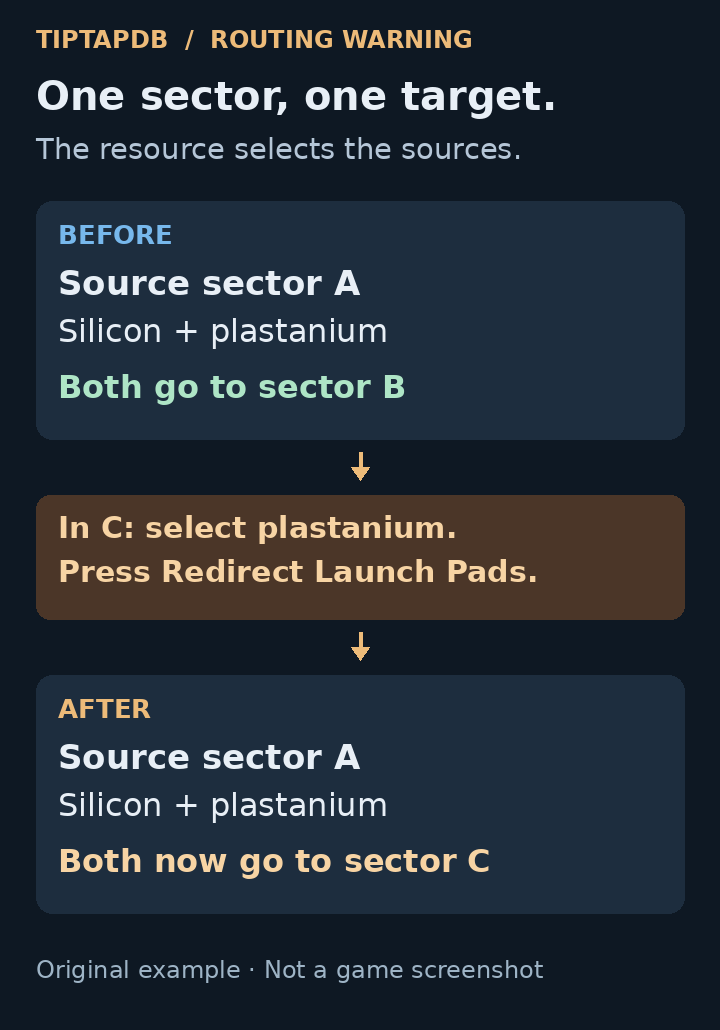
Redirecting plastanium from a source that also exports silicon changes that source sector’s destination for both resources. Original conceptual example. Selecting a resource filters source sectors; it does not split their export routes.
Before redirecting, note which sectors are supplying an existing base and where they currently send resources. For a controlled repair, visit the intended source and set its destination deliberately, remembering that this still affects every pad there.
A disabled redirect button is not automatically a broken pad. For example, no source may have a recorded export of that item, or all qualifying sources may already target the current sector.
Redirect eligibility and destination changes
Official Mindustry v160.7 source.
View the official sourceIf it still does not work
Reduce the test to one resource, one known source and one receiver with a clear output. Record:
- Game build, platform, mods and whether Legacy Launch Pads are enabled.
- Source and destination sectors, including the source pad's displayed destination.
- The source's recorded export rate and the receiver's source count/Max Total Import.
- Whether the receiver has 1,500 water, zero stored items and a completed cooldown.
- Whether a batch never arrives, arrives only once, or arrives but never reaches the core.
That separates a reproducible delivery issue from a source, routing or output problem. It is also much more useful in a help request than “my launch pads are broken.” Do not rebuild your entire export network until you know which link fails.
Latest comments
Log in to join the conversation
Log InNo comments yet. Be the first to share your thoughts!