You own a Dead Cells expansion, but a door stays shut. Or your mobile edition includes every DLC, yet you cannot find Richter or enter the Arboretum. Those symptoms do not always mean the purchase is missing.
Check two different things: does this app recognize your access to the expansion, and have you met the condition for that particular entrance? Restoring a purchase cannot supply a missing rune. Finding a key cannot repair an unrecognized purchase.
This guide covers the standard Google Play/App Store editions, Netflix Edition and Dead Cells+ on Apple Arcade. Sources were checked on November 5, 2026. Menu instructions come from mobile support; gameplay checks use the official wiki recommended by Playdigious. This is source-checked guidance, not a claim of live testing across every mobile build.
Protect the save before troubleshooting
- Netflix Edition has no cloud saves. Netflix says uninstalling or resetting the game's data removes progress that cannot be recovered. Moving to a different device starts from the beginning.
- The standard app also needs care. Playdigious advises against immediate reinstallation. On a replacement device, starting to play before cloud synchronization completes can overwrite previous progress.
Restore purchases and restore progress are different jobs. A working Restore button can bring back access to an expansion without recovering a lost campaign.
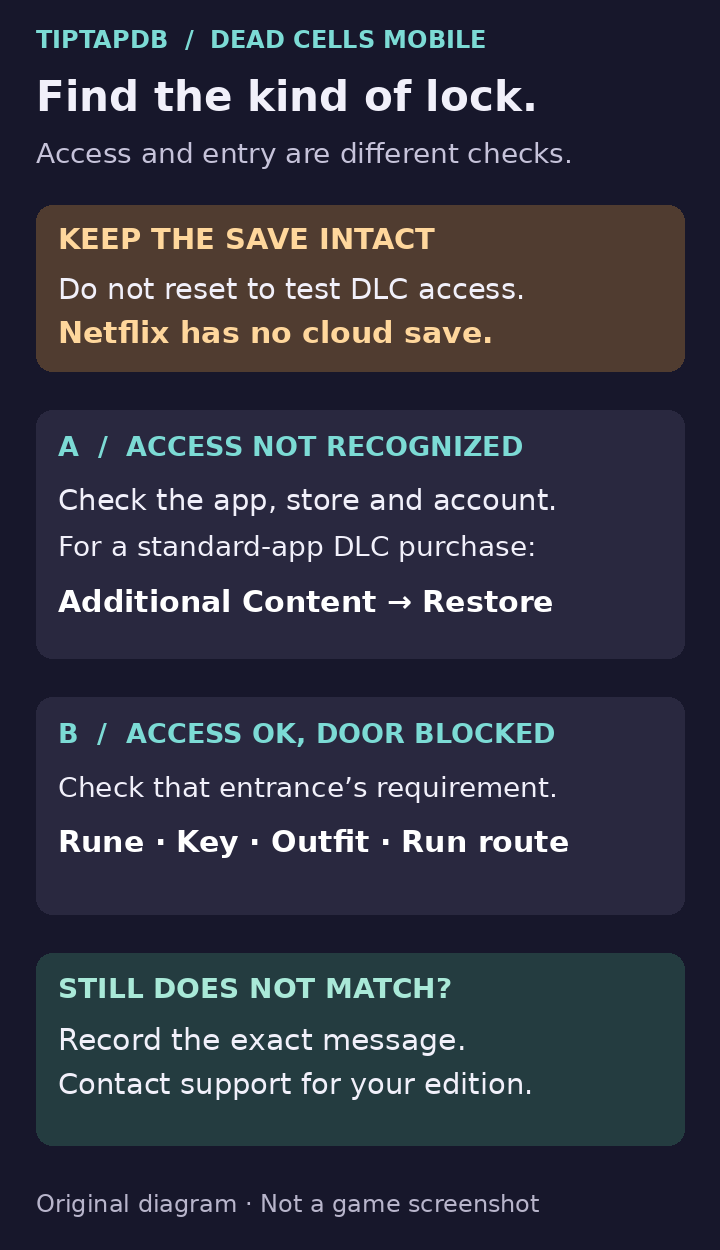
Diagnose a locked Dead Cells expansion without deleting the save: check the app and its access to the DLC, then check the entrance's gameplay requirement. Original TiptapDB diagnostic diagram. It is not a game screenshot or a tested level layout.
1. Identify the exact app and store
Check the app's full name and the store it came from before choosing a fix.
- Dead Cells, standard app: if you bought a paid expansion in this app, the purchase-account and Restore checks below apply. A receipt for the base game alone does not establish ownership of every DLC. If access came through Play Pass, distinguish that subscription access from an individual DLC purchase.
- Dead Cells: Netflix Edition: the official listing includes the original game's free and paid DLC, including Return to Castlevania. You should not need to purchase those expansions separately inside this edition.
- Dead Cells+: the Apple Arcade listing includes the four paid expansions, including Return to Castlevania. It is a separate app from standard Dead Cells.
- An Epic Games mobile installation: identify it as such when asking for help. Google Play purchase-account instructions are not a verified repair for an Epic entitlement problem.
Use the official standard Google Play listing, Netflix listing or Dead Cells+ listing to identify the product. Availability can vary by region and device.
Do not switch editions as a troubleshooting shortcut. Playdigious says saves cannot transfer between standard and Netflix or between standard iOS and Apple Arcade.
2. Read the content status and the actual door message
In the standard app, inspect Additional Content. Note what the specific expansion says there, then compare it with the message at the blocked entrance. Other editions may present their included content differently, so do not rely on a screenshot from a different app.
Use this split:
- The game asks you to buy an expansion you already purchased, or does not recognize that purchase: follow section 3.
- The expansion is recognized or included, but an entrance is missing or requires an unlock: follow section 4.
- The whole app cannot authenticate or launch: use that edition's support route. A rune or an in-run key will not fix sign-in.
A gray map icon alone is not enough to diagnose a missing licence. Record the location and exact message instead. DLC areas are reached through routes within runs; owning an expansion does not remove every prerequisite from those routes.
3. Restore a purchase in the standard app
For DLC bought in the standard Google Play or App Store version, Playdigious's supported procedure is:
- Check that the account connected in-game is the Google Play or Apple account associated with the purchase.
- Use a stable internet connection.
- Open Additional Content → Restore.
- Check that expansion again before attempting its entrance.
This is the publisher's purchase-restoration guidance. It is not an instruction to reinstall first, despite the FAQ's title.
If Restore does not resolve it, check the store record for the specific DLC, not just the base game. Confirm that the transaction completed and that you are checking the account that made it. Close and reopen the app; a device restart is another non-destructive check.
Google's purchase troubleshooting and Apple's restoration guidance explain the store-side checks. Apple also notes that in-app purchases must be allowed. If you were charged and the correct app still cannot restore the item, contact the developer rather than buying it again as a test.
For Netflix or Arcade, start with the correct app and active service access, not a search for a missing individual-DLC receipt. For an unresolved subscription or Epic-store access problem, identify that service in the support request; do not keep repeating unrelated account changes.
4. Check the gate for the expansion you want
These are targeted checks for common blocked entrances, not a complete biome route map. They assume your edition recognizes the relevant DLC.
The Bad Seed: the Arboretum key is behind a rune requirement
The Royal Gardener's room in Prisoners' Quarters requires the Teleportation Rune. The corpse supplies the Dilapidated Arboretum Key for the first entrance into the Arboretum.
If you cannot reach that room, restoring the DLC again will not help. Get the permanent rune first using our base-game rune route. After the Arboretum entrance is unlocked, that first key door does not need to be opened again on later runs while the DLC is owned.
Fatal Falls: the Cultist Outfit opens the entrance
For the first route from Fractured Shrines to Undying Shores, wear the Cultist Outfit. Its blueprint comes from cultist corpses in Fractured Shrines. If you already have the Homunculus Rune, possessing a suitable corpse can equip the outfit immediately; otherwise bring the blueprint to the Collector, unlock the outfit and equip it at the Tailor before a later attempt.
This is a requirement to enter Undying Shores, not to leave it. After that entrance has been opened once, it remains accessible on later runs. A closed first-time door is not, by itself, evidence that your Fatal Falls purchase failed.
The Queen and the Sea: complete the Crowned Key setup
For the first-time setup, find the Fisherman's letter in Prisoners' Quarters, then meet him in Toxic Sewers and follow his direction to Michel's house in Stilt Village. Defeat the Elite Armored Shrimp there and collect the Crowned Key. It opens the route to Infested Shipwreck from a passage after the second boss, such as the one after Clock Room.
If you collected that key but did not use it, the wiki describes the Fisherman's tentacle returning it in Prisoners' Quarters on the next run. Check that before assuming you must start a new save or buy the expansion again.
Return to Castlevania: distinguish the first entrance from the later route
For a fresh save, first finish the initial start-area progression so the room becomes the normal hub with the Scribe and hanging unlock bottles. The official wiki specifies talking to the Tutorial Knight on two separate runs, or winning the first run of a new save, as the trigger. Then look for the bats and Richter in Prisoners' Quarters, leading toward Castle's Outskirts.
You do not need a full-game win as a universal requirement. Nor is “die exactly three times” a reliable description of the documented condition.
The later Dracula route has a different check: after defeating Death, begin a new run and skip the early Castlevania branch. Reach Clock Room without entering the Castlevania DLC earlier in that run, then use the later route into Dracula's Castle. Entering Castle's Outskirts at the start can explain why that later opportunity is unavailable.
5. Escalate the specific failure, not just “DLC broken”
If ownership is still missing after the correct Restore checks, or a gate still contradicts the conditions above, collect:
- Exact app name, originating store, app version, device and OS.
- Expansion name and what its content menu reports.
- The exact error or door message, plus the biome where it appears.
- Which prerequisite you have completed and what you already tried.
- A relevant purchase record if requested, with unrelated payment or personal details concealed.
For the regular app, use its Support tab or Playdigious Help Center. For Dead Cells+, contact Playdigious through its Help Center or the support link on the Arcade listing. For Netflix Edition, use the contact route on Netflix's game-support page. A screenshot of the actual message is more useful than a cropped world-map tile.
Playdigious recommends the official wiki for gameplay questions. Its mechanics help identify the likely gate, but they do not prove that every mobile build is free of bugs. If your case remains inconsistent, keep the save intact and send those details to support rather than resetting it to test a theory.
Recommends the official wiki for gameplay questions
Official support or store source.
View the official source
Latest comments
Log in to join the conversation
Log InNo comments yet. Be the first to share your thoughts!