Recruiting a commander with a useful trait does not automatically let you give that trait to your next starting army. Finding an item does not automatically make it a starting item either. In Bad North: Jotunn Edition, discovering something for the Codex and unlocking it for a new campaign are separate rewards.
Look for two special markings on the campaign map: a white background behind a commander's trait symbol, or an extra white outline around an item reward. Win the marked island and collect its reward. Those are the opportunities that expand your starting choices.
The mobile edition includes the Jotunn additions, so this progression system is not exclusive to PC.
Why the Codex shows more than New Game offers
The Codex records things you have discovered, including items, traits and units. The starting-loadout menu only offers the items and traits you have unlocked for that purpose. The developer's Jotunn notes explicitly distinguish the discovery record from unlocks earned by victories on particular islands.
That means a detailed entry or familiar icon is not enough. Select the entry and check its starting status. The official Codex example shows Mines with the label “Available as Starting Item.” That is a more useful check than counting how many item pictures you can see.
“Unlockable as Starting Item” means the item can become a starting choice; it does not mean you have already earned that choice. “Available as Starting Item” is the status you want. Players have reported exactly this difference after finding many items but unlocking only one for the next start.
Players still run into this distinction: one thought most items and half the traits were unlocked, but only a small selection appeared for the starting commanders. The missing step was the special starting-unlock reward, not another purchase in the Codex.
Read the reward marker before choosing the island
Commander banner: inspect the trait background
A banner marks an island where you can recruit a commander. A symbol on that banner identifies a trait. For a starting-trait unlock, look for the white or pale panel behind that symbol, not just the fact that the symbol exists.
After successfully defending the island and recruiting that commander, the marked trait becomes an option when you create a later campaign. An ordinary trait-bearing recruit can still be valuable now, but does not necessarily add a new starting choice.
The banner symbol is also not a class label. Do not read it as a promise that the recruit is an archer, infantry or pike unit. Its job is to represent the commander's trait.
Item reward: look for the extra outline
The question-mark item badge means there is an item to win. The starting-unlock version has an additional white border around it. Check the outline, not just the question mark.
An ordinary item reward helps the current campaign. The specially outlined version also unlocks that item as a future starting choice when you win it. The mobile walkthrough and player explanations agree on this visual distinction.
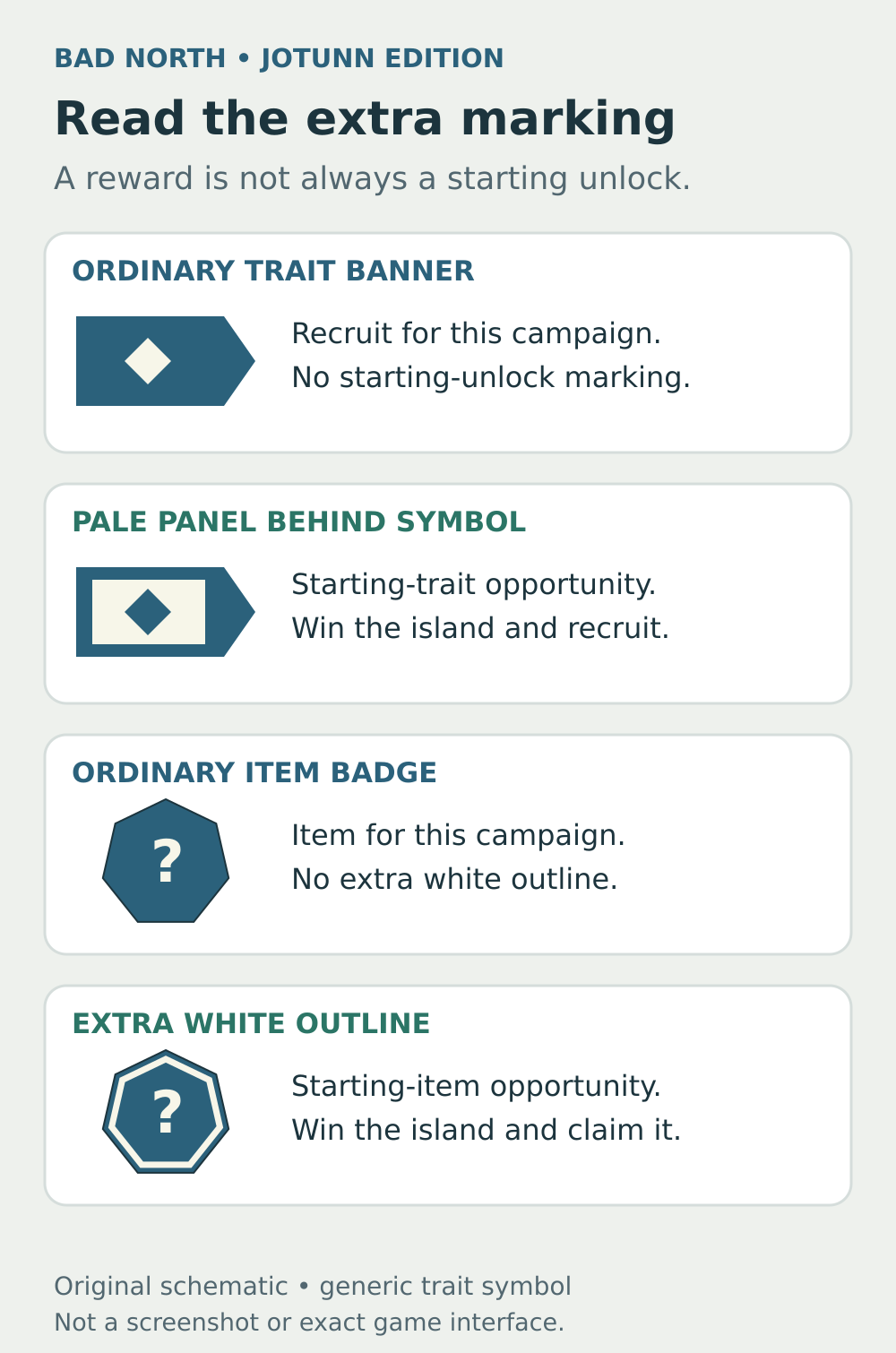
The extra marking matters. These are simplified explanatory symbols, not screenshots or an exact recreation of the game's interface.
Win the marked island, then check the result
Use this short sequence whenever you are hunting a starting option:
- Inspect the island reward before committing. Confirm that it has the special starting-unlock marking.
- Successfully defend the island and receive its commander or item reward.
- Check the relevant Codex entry's starting status afterward.
- When you create a new campaign, inspect the loadout choices for its first two commanders.
You do not need to finish the entire campaign just to unlock an item or trait from a qualifying island. The island victory is the relevant step. A full campaign victory does not convert every ordinary item and trait you encountered into a starting option.
This explains an otherwise confusing result: finishing a campaign with many differently traited commanders can still leave you with only a few traits available at the next start. You gained more allies than starting unlocks.
The permanent reward is a new choice in starting-loadout setup, rather than continuing the same campaign.
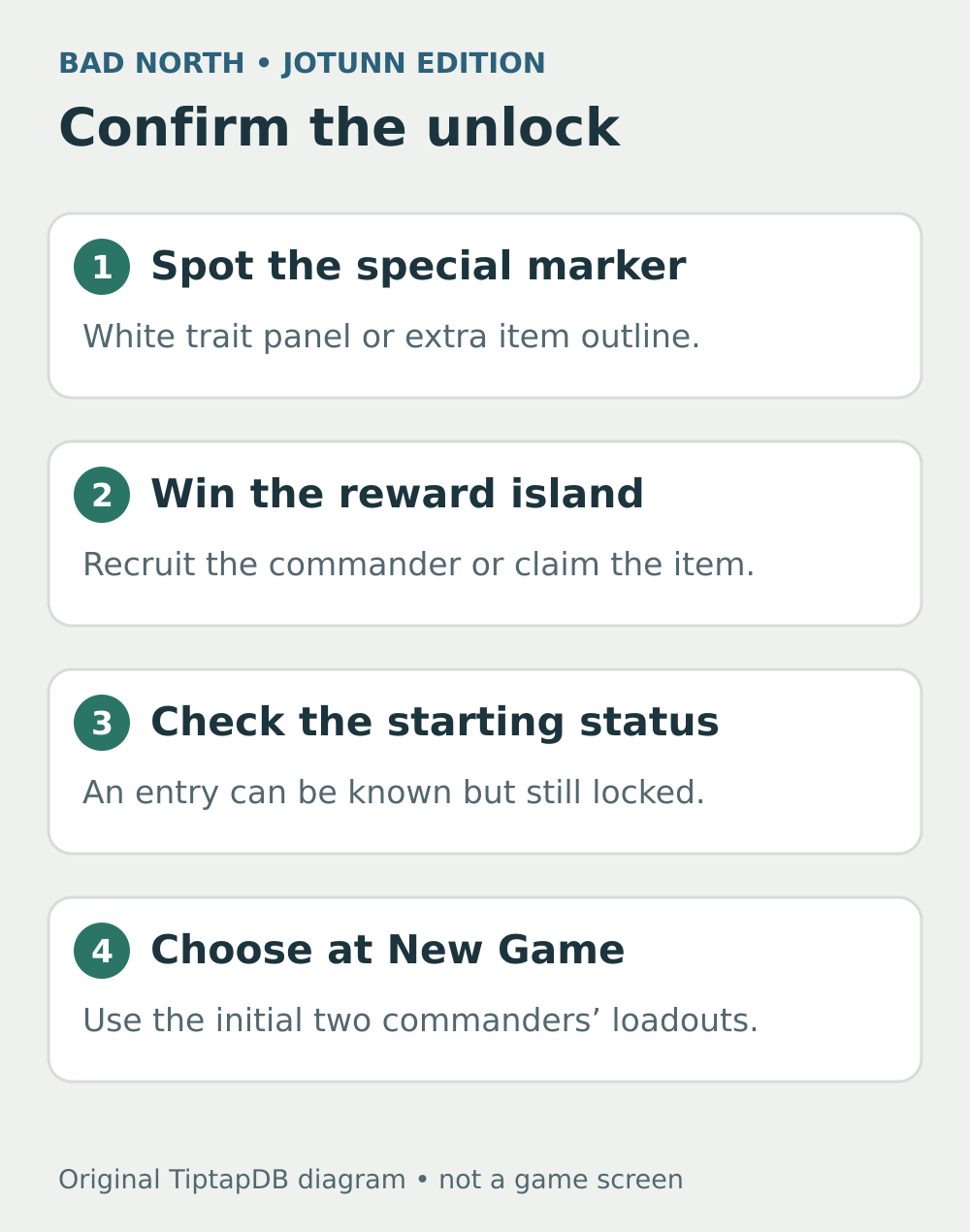
Check the result after the island. Do not use the number of discoveries in the Codex as your unlock count.
Route toward the reward without sacrificing the run
Once you recognize a marked island, treat it as a deliberate route target. Check the enemies and the units you can still deploy before spending them elsewhere. A reward you cannot reach or win is not an unlock.
Also look at the advancing Viking frontier before ending the turn. The dotted boundary tells you which islands will become unavailable. Do not assume a marked reward will remain reachable while you clear unrelated islands.
For example, suppose one reachable island offers an ordinary new commander while another shows a white-backed trait you want for future runs. If both fights are manageable, the marked reward is the one that advances that long-term goal. If the marked island is too dangerous for your remaining squads, preserving the army may still be the better decision. The white marking identifies the reward; it does not make the battle safe.
Avoid treating every restart as guaranteed progress toward a particular item. Search the maps you get and verify the reward you earn. There is no need to risk your only good campaign because a guide promises a specific unlock after a fixed number of attempts.
If a choice is still missing
First separate these situations:
- You can see it in the Codex, but it is not marked as available at the start: you have discovered it, but still need its starting-unlock reward.
- You used it on a recruited commander: that confirms it existed in that run, not that it was a marked unlock.
- You won an ordinary item island: you earned the item for that campaign, but the extra outline is what identifies the starting opportunity.
- You are continuing an existing campaign: starting selections belong to the creation of a new campaign, not a mid-run respec menu.
If it was selectable before but vanished after reopening the game, investigate a possible progress-saving problem rather than hunting the same reward again. In a response to a Codex-reset report, developer rtm223 said the Codex should persist without extra action from the player.
If the Codex really says it is available as a starting option but New Game does not offer it, compare the choices for both starting commanders, then record the exact item or trait, your platform, and screenshots of the Codex and setup screens. That is a different problem from simply finding an unfamiliar icon. Keep the save while investigating rather than deleting it to repeat a campaign unnecessarily. Use the game’s official support contact for a persistent mismatch.
Sources and further reading
Official mobile scope
Read the developer announcement confirming that mobile includes the Jotunn additions.
Read the sourceOfficial starting-unlock rules
Read the developer explanation of Codex discoveries and unlocks earned on specific islands.
Read the sourceOfficial Codex example
Inspect the official Codex image showing the Available as Starting Item label on Mines.
Read the source
Unlockable versus available
Read the player question distinguishing these two Codex labels after a completed campaign.
Read the sourceA starting-selection example
Read the player example of many visible Codex entries but only a few starting choices.
Read the sourceTrait-unlock markers
Check the mobile walkthrough’s description of white trait backgrounds and item outlines.
Read the sourceBanner symbols explained
Read player explanations of trait symbols and the special markings on island rewards.
Read the sourceItem and trait rewards
Read the community explanation of outlined item rewards and white-backed trait rewards.
Read the sourceIsland victory versus campaign victory
Read the corrective answer specifying that the marked island, not a full campaign win, earns the unlock.
Read the sourceMany recruits, few starting traits
See why finishing with many trait-bearing recruits does not unlock every trait for the next run.
Read the sourceDeveloper clarification on persistence
Read developer rtm223’s first reply confirming that the Codex should persist without extra action.
Read the sourceOfficial support
Use the official contact page to report a persistent mismatch between Codex status and setup choices.
Read the source
Latest comments
Log in to join the conversation
Log InNo comments yet. Be the first to share your thoughts!