Daybreak Island rewards steady progress: collect your Life Essence, invest in production, and buy the Prosperity you need for your next upgrade. Once that foundation is in place, develop the decorations that support your account’s goals.
This guide builds on the original WhiteoutSurvival.pl Daybreak Island guide, with mechanics checked against the official Help Center and the March and July 2026 updates. Prices, requirements, and available shop items should always be checked in your own game.
Original WhiteoutSurvival.pl guide
The starting point for this updated guide and its illustrations.
Read original guideQuick-start priorities
- Collect from the Tree of Life before its storage fills.
- Check the requirements for your next Tree of Life upgrade before spending.
- Add or upgrade decorations when you need more Prosperity.
- Improve your Lumber Camps while there are trees left to clear.
- Keep the Lv. 1 decoration copies needed for planned upgrades.
- Recheck your island’s active bonuses after changing the layout.
These priorities are a practical spending plan, not a fixed purchase order. Your next useful investment depends on what is currently holding back progress.
1. Understand Life Essence and Prosperity
Daybreak Island becomes accessible through the dock at Furnace Level 19.
Life Essence is the island’s currency. You spend it on Tree of Life and Lumber Camp upgrades and on decoration purchases.
Prosperity is a separate measure. Placing qualifying decorations and upgrading them can raise it. Before buying anything, check whether your next target needs more Essence, more Prosperity, or both.
The distinction matters: a purchase can consume the Essence you were saving without adding the Prosperity you expected. Always inspect the item’s level, Type Limit, and upgrade preview first.
Official Daybreak Island Help Center
Look up current in-game rules for island unlocks, Lumber Camps, decoration bonuses and recycling.
Read source2. Build your collection routine around the Tree of Life
The Tree of Life’s uncollected Life Essence reaches its storage limit after 12 hours. This is specifically the Tree of Life’s storage rule, not a blanket limit for every source of island income.
A useful routine is to collect in the morning and evening, adjusting the times so the gap does not regularly exceed 12 hours. Collect before a long break rather than relying on a reminder after storage has already filled.
Helping allies care for their Trees of Life also gives Life Essence to both players.
An island can receive help only once every six hours. If you cannot help a particular ally, someone may already have done so. Look for another island with an available help marker and use the opportunities shown in your game. The six-hour restriction applies to receiving help on that island.
3. Spend toward the next useful upgrade
The original guide recommends prioritizing Tree of Life growth and supporting it with Lumber Camp development. That remains a sensible early-game approach: avoid spending your upgrade budget on an attractive decoration without checking what the purchase delays.
Use this decision process:
- Enough Prosperity, short of Essence: save toward the planned upgrade.
- Short of Prosperity: compare the eligible decorations and upgrades that can close the gap.
- Plenty of uncleared forest: review whether a camp upgrade or another available camp would help.
- Production goals already met: focus more spending on the bonuses and progression rewards you want.
Tree of Life Level 10 is a useful milestone because it unlocks access to the Starry Lighthouse Blueprint in the shop. Treat it as a milestone, then follow the requirements displayed for your later progression.
Tree of Life levels 1–10: community reference
The table below was cross-checked against two independent community references. It is a community reference, not an official current-build data table. Check your upgrade screen before committing resources.
| Lv. | LE cost | Pros. | LE/h |
|---|---|---|---|
| 1 | 0 | 0 | 120 |
| 2 | 500 | 150 | 150 |
| 3 | 1,000 | 600 | 180 |
| 4 | 5,000 | 1,200 | 210 |
| 5 | 10,000 | 2,400 | 240 |
| 6 | 20,000 | 4,000 | 270 |
| 7 | 30,000 | 7,000 | 300 |
| 8 | 50,000 | 10,000 | 330 |
| 9 | 70,000 | 15,000 | 360 |
| 10 | 100,000 | 20,000 | 390 |
The cost is for reaching that individual level, not the cumulative cost. Prosperity is a requirement rather than a resource spent on the upgrade. Hourly output refers only to the Tree, not total island income. These Tree upgrades total 286,500 Essence, before the separate cost of decorations and camps.
The original WhiteoutSurvival.pl guide places the second Lumber Camp unlock at Tree of Life Level 5. Use that as a planning milestone, then confirm the requirement and price shown in your shop.
4. Use Lumber Camps to clear useful space
Building and upgrading Lumber Camps improves forest clearing. After unlocking your first camp, you can obtain another from the shop after meeting its Tree of Life requirement. The official Type Limit for Lumber Camps is two; check your shop for the precise unlock requirement.
Workers choose their own targets and begin with trees near their camp. Move a camp beside the area you want cleared, then reposition it as the forest recedes. Rotating a camp is not a way to select an individual tree.
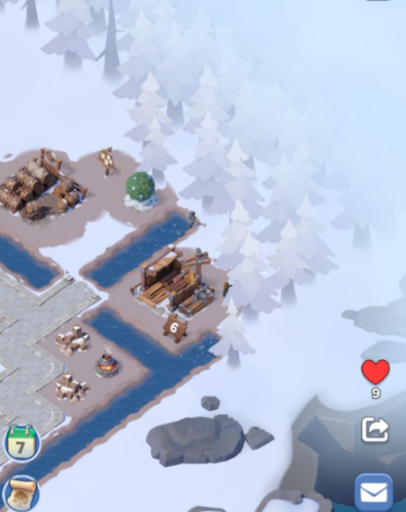
Lumber Camps near the forest. Move camps toward the area you want cleared. Image: WhiteoutSurvival.pl.
For layout planning, open enough space for your next useful buildings before spending time perfecting every decorative detail. Keeping camps close to the remaining trees is a straightforward, supported way to influence clearing direction.
Camps continue working while you are offline. Woodcutter efficiency increases while you are actually viewing the Daybreak Island screen, so being elsewhere in the game is not the same thing.
Once every tree has been cleared, the Lumber Camps stop supplying Life Essence and become ordinary decorations. Clearing the forest rewards a Timbermill that produces Essence instead. Keep that transition in mind when deciding how much more to invest in camps near the end of clearing.
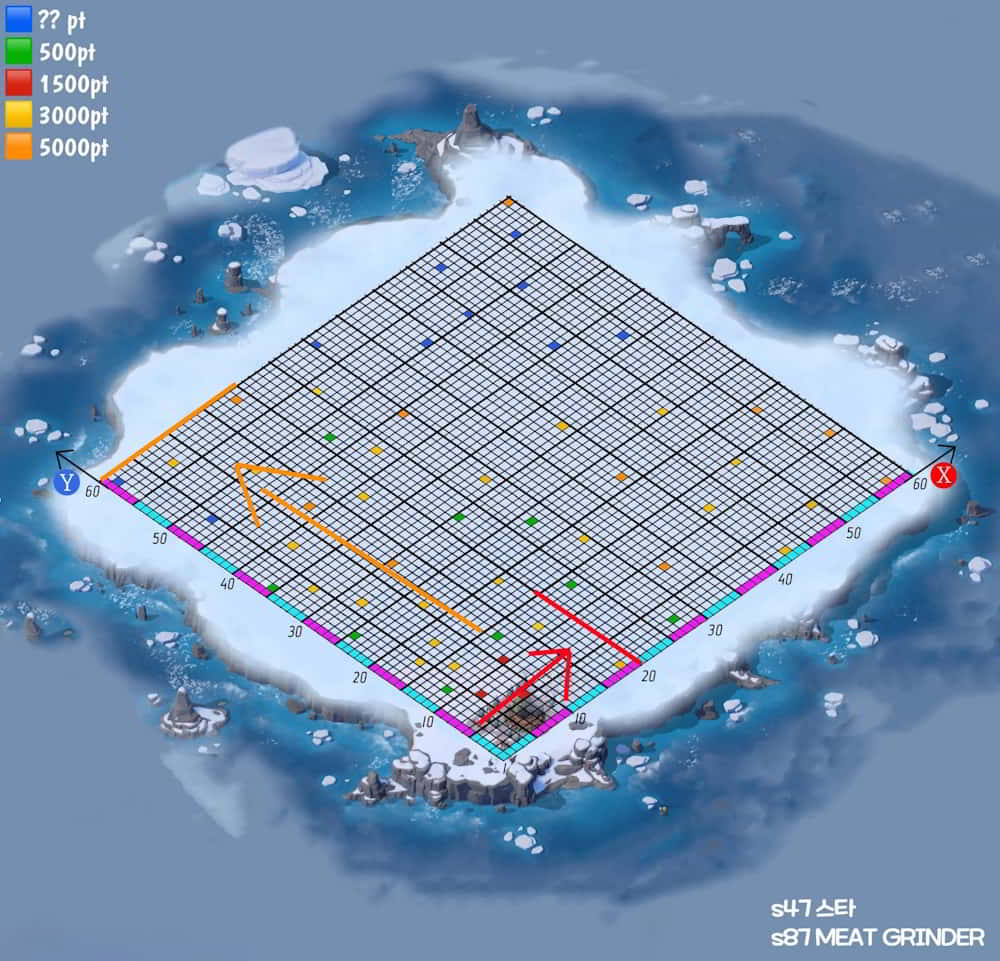
Clearing-route example from the original WhiteoutSurvival.pl guide. Treat it as a planning reference; pictured rewards and an optimal route are not guaranteed.
5. Decoration duplicates: upgrades versus extra placements
Duplicates can be useful even when another placed copy would give no bonus.
Ordinary decoration upgrades consume Lv. 1 decorations. Tree of Life and Lumber Camps use a different upgrade system. Keep the copies required by the upgrade panel for decorations you plan to develop, and check special buildings separately.
The Type Limit controls how many placed copies of a decoration type contribute bonuses. Copies beyond that limit add no further bonuses, and higher-level copies take priority. Buying an upgrade material and placing an extra active decoration are therefore different decisions.
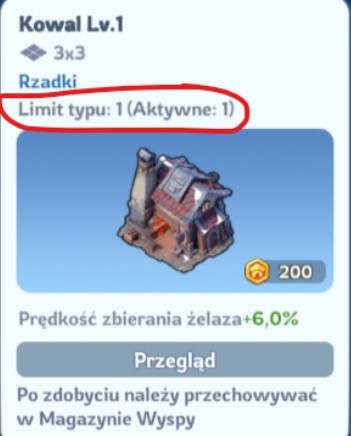
The Polish Blacksmith panel shows Type Limit 1 and Active 1. Extra copies can still serve as upgrade materials. Image: WhiteoutSurvival.pl.
For example, if a type has a limit of one and you already have a stronger copy placed, another Lv. 1 copy will not add a second active bonus. It may still be needed for an upgrade. Do not interpret the limit as a reason to avoid all duplicates.
Bonuses from different decoration types can stack, which makes diversifying useful when the available options suit your goals.
Type Limits and active bonuses
Official explanation of why extra placements may add no bonus.
Read source6. Compare the benefit of your next purchase
For a Prosperity target, compare the Essence you must spend with the additional active Prosperity the purchase or upgrade will provide. Use the increase on your island, not simply the number printed on an extra copy that will sit beyond its Type Limit.
For the original guide’s early purchases, two 1,000-Essence items providing 50 Prosperity each give the same 100 Prosperity as one 2,000-Essence item providing 100. Both cost 20 Essence per Prosperity, provided every placed item counts. The two-item option helps a purchase-count achievement if those purchases qualify; it does not improve the basic Prosperity ratio.
Likewise, treat the original 3,000-Essence recommendation as a shortlist, not an automatic best buy. Divide total purchase or upgrade cost by the extra active Prosperity gained, then compare the useful bonuses. Include required duplicate materials in that cost.
For account bonuses, decide what you need most right now, then compare the eligible options in the shop and upgrade preview. The cheapest item is not automatically the best investment, and a useful long-term bonus may be worth more to you than a small short-term saving.
Avoid using one fixed Essence price as a universal buying rule. Available decorations, your existing collection, and the next requirement all affect the result. Before confirming a purchase, answer three questions:
- What exactly will this add to my current island?
- Does it advance the upgrade or bonus I am targeting?
- What will I have to postpone to afford it?
7. Check bonuses before storing or recycling decorations
Retrieving decorations from the island can reduce both Prosperity and stat bonuses. After rearranging your layout, check the totals rather than assuming everything in storage still counts.
The Recycle Shop can recover some value from unwanted items, but check upgrade needs before selling. The official FAQ states that recycling returns half the original selling price.
Eligibility also matters. The Help Center distinguishes Marketplace decorations from event and pack items, excludes Lumber Camps, and sets an extra condition for excess Mythic duplicates: the decoration must first be at maximum level. Review the current confirmation screen for the actual eligible items and return.
8. Plan beyond early island development
Starry Lighthouse and accessory materials
The Starry Lighthouse uses its own blueprint system. Its upgrade screen accepts Starry Lighthouse Blueprints, and the official exchange rate is ten General Accessory Construction Contracts for one blueprint.
General Accessory Construction Contracts become available in the Daybreak Island Shop at Tree of Life Level 10, with purchase limits refreshing weekly. Check the timer and budget for them when they serve your next goal.
March 2026 additions
The update released on March 2 and announced on March 4 added:
- Bloom Balustrade as a basic decoration.
- Reward-bearing Explore Daybreak Island missions.
- Blessing of Daylight missions after the Tree of Life is maxed out, with rewards tied to Prosperity targets.
- A button for previewing decoration effects after upgrading.
Use those mission targets and previews to guide later spending.
July 2026 additions
The July 6 update added Frostgrove and the Mark of Revival Shop. Once the required Tree of Life level and State Progress are reached, players can purchase Marks of Revival from Daybreak Island Supplies and exchange them for decorations and accessories. Shop contents become available in stages as State Progress advances.
If an item is missing, check both requirements before assuming something is wrong. The announcement does not provide a universal numerical unlock threshold.
Daily island checklist
- Collect Tree of Life Essence before its 12-hour storage window is exceeded.
- Collect other available island output and claim completed mission rewards.
- Help eligible allies.
- Check your next Tree of Life requirement before buying decorations.
- Reposition Lumber Camps when the nearest useful area is cleared.
- Keep materials for planned decoration upgrades.
- Check shop refreshes and newly available progression rewards.
- Verify Prosperity and bonuses after changing the layout.
The most useful habit is simple: choose your next target before spending. Regular collections, deliberate upgrades, and attention to active bonuses will keep your island moving forward without filling it with purchases that do little for your current progress.
Latest comments
Log in to join the conversation
Log InNo comments yet. Be the first to share your thoughts!