
If an Unciv city has stopped growing, open its city screen before building more farms. Check the population message, the current construction, Avoid growth and your empire’s happiness. A city can have plenty of food-producing land and still gain no population because its citizens are working elsewhere, its surplus is going into a Settler, or a growth restriction is active.
This guide covers Unciv 4.22.17 with the built-in Civ V - Gods & Kings ruleset. Other rulesets and mods can change the penalties and unit abilities.
Start with the message under the city statistics
The city screen separates population growth from border expansion. Food increases population; culture expands the city’s territory. If the message says “Stopped expansion,” you are looking at the culture side of the problem. Increasing food will not directly fix that message.
For population, use the displayed message to choose your first check:
- “Food converts to production”: inspect the current construction. A Settler uses surplus food to help production.
- “Stopped population growth”: check Avoid growth, happiness, resistance and whether the city has enough net food.
- “Turns to lose population”: address the food deficit. A setting that prevents growth does not make citizens stop eating.
- “Turns to new population”: a positive food gain is being reported. Check the estimate and stored-food fraction, but still inspect Avoid growth if population does not increase.
The food fraction beside the message shows the current store and the amount needed for the next citizen. That is more useful than counting food icons across the surrounding map. A bigger population needs a larger food store for its next increase, and game speed changes the requirement.
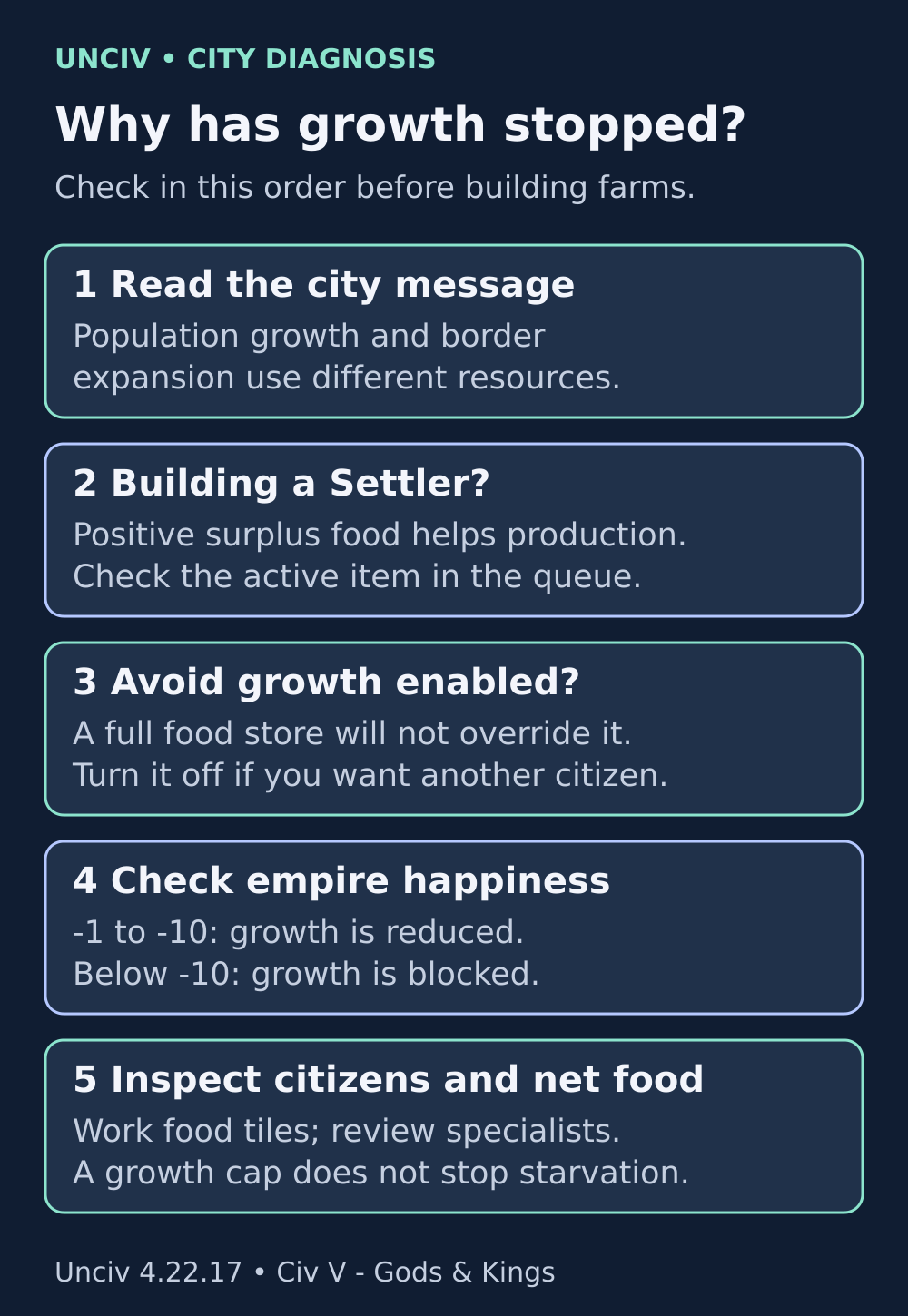
Read the city’s status before spending gold or worker turns. Several common causes do not need another farm.
Check whether you are building a Settler
In the built-in Gods & Kings ruleset, the Settler has an ability that converts excess food to production while it is under construction. The city can therefore be well fed without adding that surplus to its population-growth store. The city screen explicitly reports the conversion.
Look at the item currently being built, not merely whether a Settler appears somewhere in the queue. The conversion applies to the active construction. If you want the city to grow first, move another suitable construction to the front and inspect the food display again. If you need the Settler now, the temporary pause may be exactly what you intended.
Do not expect every point of spare food to become one point of production. The conversion uses its own calculation. For diagnosis, the important sign is the conversion line and the change in net food when the active construction changes. You do not need to calculate the whole production formula to determine why population has stopped.
Keep enough food to feed the city. The conversion acts on a positive surplus; it is not permission to remove all food-producing citizens. If a starvation warning appears, solve that separately rather than assuming the Settler protects the population.
Turn off Avoid growth if you want another citizen
Avoid growth is a real population cap in this release. Once stored food reaches the next-population threshold, the setting prevents the increase and caps the store at that threshold. More farms cannot override it.
If the city has a full food store but refuses to grow, check this setting early. Turn it off when you are ready for another citizen, then recheck the city’s status. Other restrictions can still apply, so switching it off is a test rather than a guarantee of immediate growth.
Avoid growth can be useful when you deliberately want to hold a city at its current size. It does not remove its food upkeep, and it does not protect a poorly fed city against starvation. The population update handles a negative food store before it applies the Avoid growth cap. Leave enough citizens on food-producing tiles even when you do not want an additional citizen.
Check the empire’s happiness, including the exact threshold
In the built-in Gods & Kings ruleset, happiness can slow or stop growth across your cities. A local food improvement may help a slow city, but it cannot remove an empire-wide growth prohibition.
- Happiness 0 or higher: this ruleset’s negative-happiness growth penalties are inactive.
- Happiness from -1 through -10: a -75% growth modifier applies in all cities.
- Happiness below -10: growth is nullified. At integer values, -11 is the first value in this band.
Exactly -10 belongs to the reduced-growth band, not the no-growth band. If you improve happiness from -11 to -10, growth is no longer blocked by this particular rule, but the large slowdown remains. Reaching 0 removes the negative-happiness growth modifier. Other bonuses, restrictions and your net food still matter.
Open the happiness breakdown and address a source you can actually change. For example, check whether a recent expansion or conquest coincided with the slowdown, and inspect the happiness effects offered by your available buildings, resources or policies. Do not queue food buildings in every city before checking whether all of them stopped at the same time.
Old discussions sometimes describe severe unhappiness preventing starvation as well as growth. Do not use that as a strategy for this version. The 4.22.17 food calculation removes positive growth when the nullifying rule is active, but preserves a negative food balance. You still need to feed your citizens.
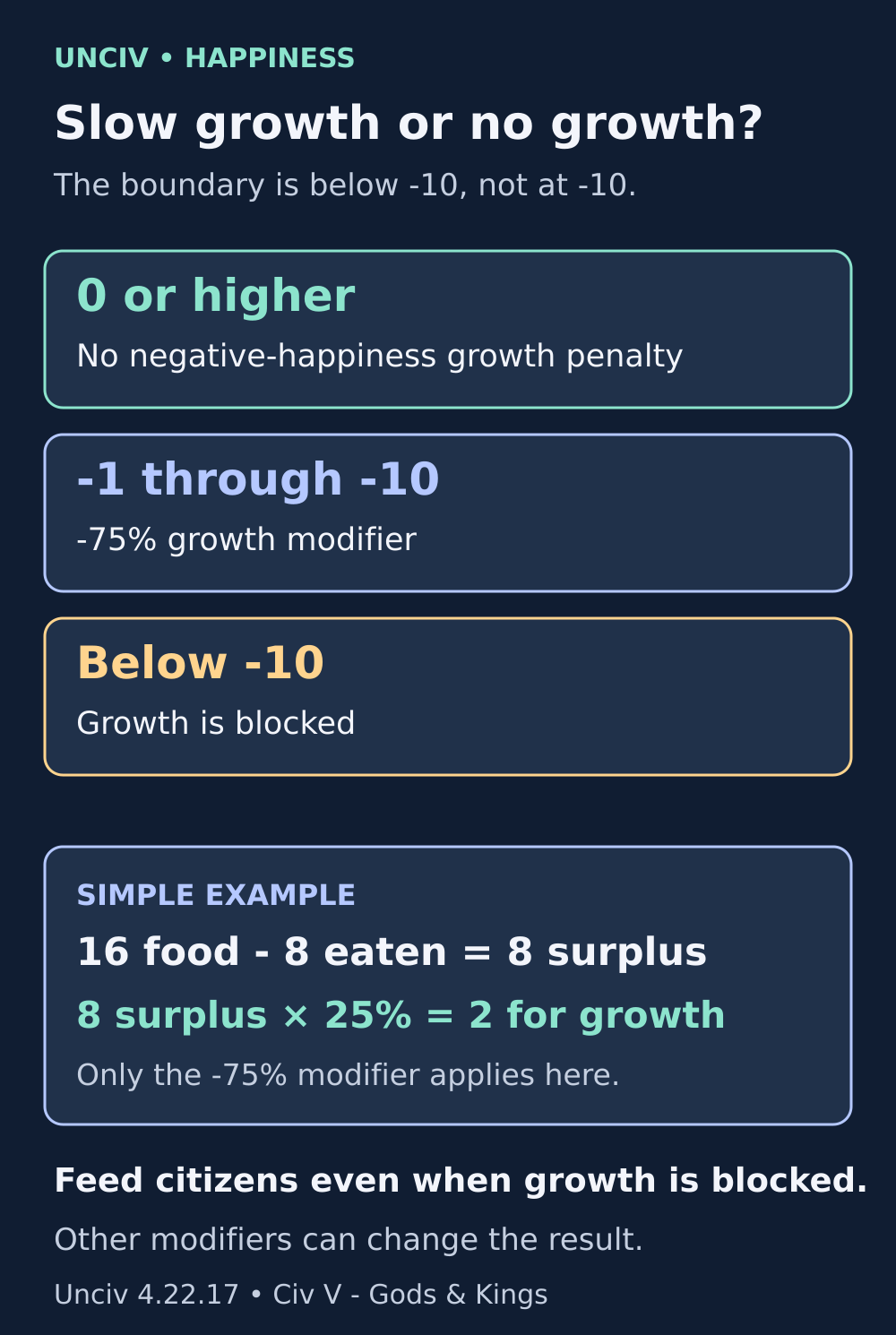
The example assumes no other growth modifiers or restrictions. At -10 the penalty still slows growth; below -10 it blocks growth.
Count food from worked tiles, not every owned tile
Owning a farm does not mean a citizen is working it. Inspect the city’s assignments and the food breakdown. A nearby food-rich tile may be unworked, outside the city’s workable area, or assigned to another city. The tile information distinguishes ownership from which city is working it.
For an ordinary citizen without a consumption modifier, the baseline food cost is 2 per turn. Specialists are citizens too. Moving someone from a farm into a specialist slot can remove the farm’s food output while leaving that citizen’s food consumption in place.
Use a small reversible comparison: move one citizen from a low-food assignment to an available higher-food tile, then look at the city’s net food and growth estimate. If the estimate improves, assignments were part of the problem. Keep the change only if the loss of production, science or another yield suits your plan.
Food focus can help automatic assignment prioritize food, but inspect locked tiles and manual specialist choices as well. A focus choice is a way to guide assignments, not a new source of food. If you have deliberately locked citizens onto production tiles, review those locks rather than repeatedly pressing a focus option and expecting a different result.
Here is a simple food budget. Suppose the city produces 16 food in total and has four citizens, with no consumption or growth modifiers. Feeding them uses 8, leaving 8 for growth. With only the -75% growth penalty, that surplus becomes 2. The original food production has not disappeared; the growth penalty acts after feeding the population. If the city is building a Settler or a growth-blocking rule applies, check that additional cause too.
A very small surplus can also round to zero. The food added each turn is rounded to a whole number, so +0.4 adds nothing to the store that turn. When growth seems stuck despite a small positive figure, inspect the final food value after modifiers and aim for a meaningful surplus rather than relying on the sign alone.
A conquered city needs a separate check
Look for the resistance message and its remaining turns. While resistance is active, the usual city yields are suppressed, so comparing the surrounding farms with an ordinary city will give a misleading diagnosis. Do not assume a captured city should immediately behave like a settled one.
When resistance ends, inspect the assignments, net food and empire happiness again. Treat them as separate checks: an ended resistance timer does not prove that the citizens are working the tiles you intended, nor that your empire has escaped a growth penalty. A conquered city can have more than one reason for poor growth.
Make one change, then verify the result
Before ending the turn, note the population, stored-food fraction, current construction, net food, happiness and Avoid growth setting. Change only the suspected cause. Reopen or refresh the city view and compare the status message and estimate.
If you next advance a turn, compare the food store as well as the population. A city that needs several turns to grow will not add a citizen immediately. Also check for changes during that turn, such as a completed Settler, an expired happiness source or a reassigned citizen.
If the numbers still disagree, record the exact app version, ruleset, active mods and a screenshot of the city’s food breakdown. Keep a separate save before experimenting further. The official issue tracker is the right place to check for an existing report or describe a reproducible problem; an old screenshot from a different ruleset is not enough to establish a current bug.
Sources and further reading
Mechanics checked against Unciv 4.22.17 and its built-in Civ V - Gods & Kings ruleset on 6 November 2026. Mods and other rulesets may differ.
City-screen messages
See how the city screen chooses growth, starvation, expansion and food-conversion messages.
Read the sourceSettler rules
Verify the Gods & Kings Settler ability that converts excess food to production.
Read the sourceFood and production calculation
Follow food consumption, growth modifiers, Settler conversion and resistance in the city calculation.
Read the sourcePopulation and Avoid growth rules
Check the stored-food threshold, starvation update and Avoid growth cap.
Read the sourceGods & Kings happiness rules
Verify the reduced-growth band from -1 through -10 and the growth block below -10.
Read the sourceTile ownership and work information
See the separate ownership and working-city labels, plus tile lock controls.
Read the sourceUnciv issue tracker
Search existing bug reports or describe a reproducible problem with your version and ruleset.
Read the source
Latest comments
Log in to join the conversation
Log InNo comments yet. Be the first to share your thoughts!