
If your inventory turned grey after an unblessed Ankh revived you, your equipment has usually not been deleted. You have Lost Inventory: most items remain unavailable until you find and pick up your lost backpack. Trying to clear the grey icons or make room in the bag will not solve it.
On a normal, unlocked floor, the backpack stays where you died and your hero reappears elsewhere on that same floor. A sealed fight has a different recovery route, explained below. These rules cover Shattered Pixel Dungeon v4.0.2, not the original Pixel Dungeon or another variant.
First, check which kind of revival happened
- You chose two items and woke up elsewhere: an unblessed Ankh was used. Check Lost Inventory and recover the backpack.
- You revived on the spot with your belongings still available: a blessed Ankh saved you. There is no Ankh backpack hunt to complete.
- The run ended without a resurrection choice: this recovery route is no longer available. Starting a new hero does not continue the old hero's backpack search.
- Your gear became unavailable after entering a special quest, without an Ankh revival: do not apply these death-location instructions to that situation.
You can inspect the Lost Inventory status in-game. Its description explains why most items cannot be used or picked up. That includes ordinary potions, scrolls and equipment; collecting something such as gold does not prove your backpack has returned.
If you are still choosing the two items
The resurrection window initially suggests your equipped weapon and armour, but those are defaults you can change. Tap each item slot to choose what you will keep available during the recovery trip, then check both selections before confirming.
In v4.0.2 you can choose an eligible item from your inventory, including equipment you were not wearing. Ankhs and bags cannot be selected. Choosing the same item for both slots leaves the other slot empty, so do not click through a missing-item warning without checking it.
Choose for the journey back, rather than automatically choosing your two most valuable possessions:
- Weapon and armour are a sensible starting point if they let you survive the enemies on this floor.
- A known escape item can be more useful when another fight would kill you. Consider its charges or remaining uses, and the protection you give up to preserve it.
- A spare weapon or armour piece still needs to be usable by your hero. Selecting unequipped gear does not automatically equip it after revival.
- Class equipment needs attention too. Do not assume your bow, cloak, staff or tome will remain usable merely because it belongs to your class.
There is no universally best pair. The aim is to reach the backpack alive. An expensive item you cannot use on that trip may help less than an ordinary item that gets you out of danger.
Find the backpack on the correct floor
For an ordinary unblessed revival, follow this sequence:
- Read your current status and check the two available items. You return healed, with hunger reset and a short period of invisibility. Check your health bar and usable equipment before moving. That is a chance to move away from danger, not permission to repeat the fight that killed you.
- Orient yourself on the current floor. Your explored-map information for that floor is cleared. The unfamiliar map does not mean the backpack was sent to a different level.
- Work back towards the death location. The hero is relocated; on an unlocked floor, the backpack is left at the death tile.
- Pick up the lost backpack itself. Seeing it or walking near it is not enough. Once collected, Lost Inventory is removed and the unavailable belongings become accessible again.
- Recheck equipment and quick slots before fighting. Make sure the weapon, armour and escape options you intend to use are actually available.
The revival rules give ordinary and locked floors different recovery locations. The backpack's pickup behaviour restores access to your belongings.
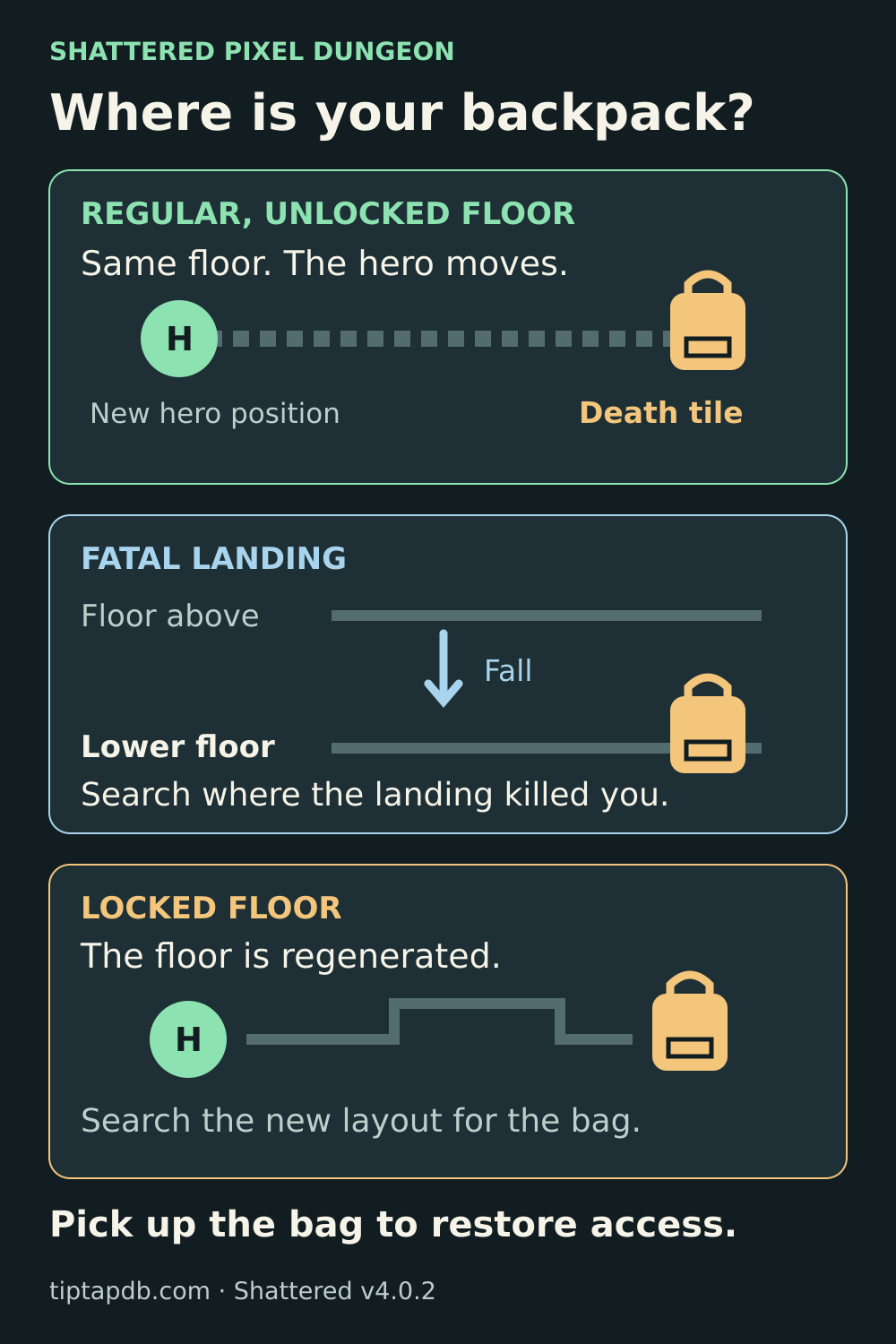
Find the right floor before searching. A fatal fall and a sealed fight change which location you should look for.
If you died from falling into a chasm
For a normal fall to the next depth, landing damage is applied after you arrive on the lower floor. If that damage kills you and an unblessed Ankh revives you, look on the landing floor, not only beside the hole on the floor above.
On an unlocked landing floor, the backpack belongs at the landing/death position. Your hero can then be moved away from it by the resurrection. Check the displayed depth before spending health climbing around the wrong level.
If the floor was locked during a boss fight
An unblessed resurrection on a locked floor regenerates that level. The backpack is placed at a respawn location on the regenerated floor, with an entrance fallback if needed. It is not guaranteed to be on the old death square or beside your revived hero.
Search the regenerated floor and be ready for the encounter to have reset. The condition is whether the floor was locked when you died, not simply whether its depth is normally used for a boss. A cleared, unlocked boss floor follows the ordinary recovery rules.
Do not rely on older descriptions saying that you automatically keep the full inventory in every boss fight. In v4.0.2 you still have to recover your backpack after reviving on a locked floor.
Why another Ankh may not save you yet
If you carried several Ankhs, the unused ones are part of the unavailable inventory after an unblessed resurrection. You cannot choose an Ankh as one of your two preserved items, and your other Ankhs cannot revive you while they remain unavailable. Recover the backpack before counting on another revival.
This makes the return trip more dangerous than your health bar suggests. You may have lost access to rings, healing, ranged tools and defensive effects. Avoid unnecessary fights and side rooms until the bag is back.
Blessing the next Ankh avoids the backpack hunt
With an unblessed Ankh and a full waterskin of 20 dew, open the Ankh and use Bless. This empties the waterskin, so count the healing resource you are spending. Confirm that the item's description now says it is blessed; the item also gains a pale glow.
An unused Well of Health is another option: throw the unblessed Ankh into it before stepping into the well yourself. This blesses the Ankh and uses up the well, so you give up that well's other benefits. Pick up the Ankh afterwards.
A blessed Ankh activates automatically when it saves you. It is consumed, keeps you in place with your inventory, restores one quarter of maximum health, rounded down, and gives about three normal turns of invulnerability. It is not a full heal, and that protection is brief. Use the window to heal, escape or deal with the immediate threat.
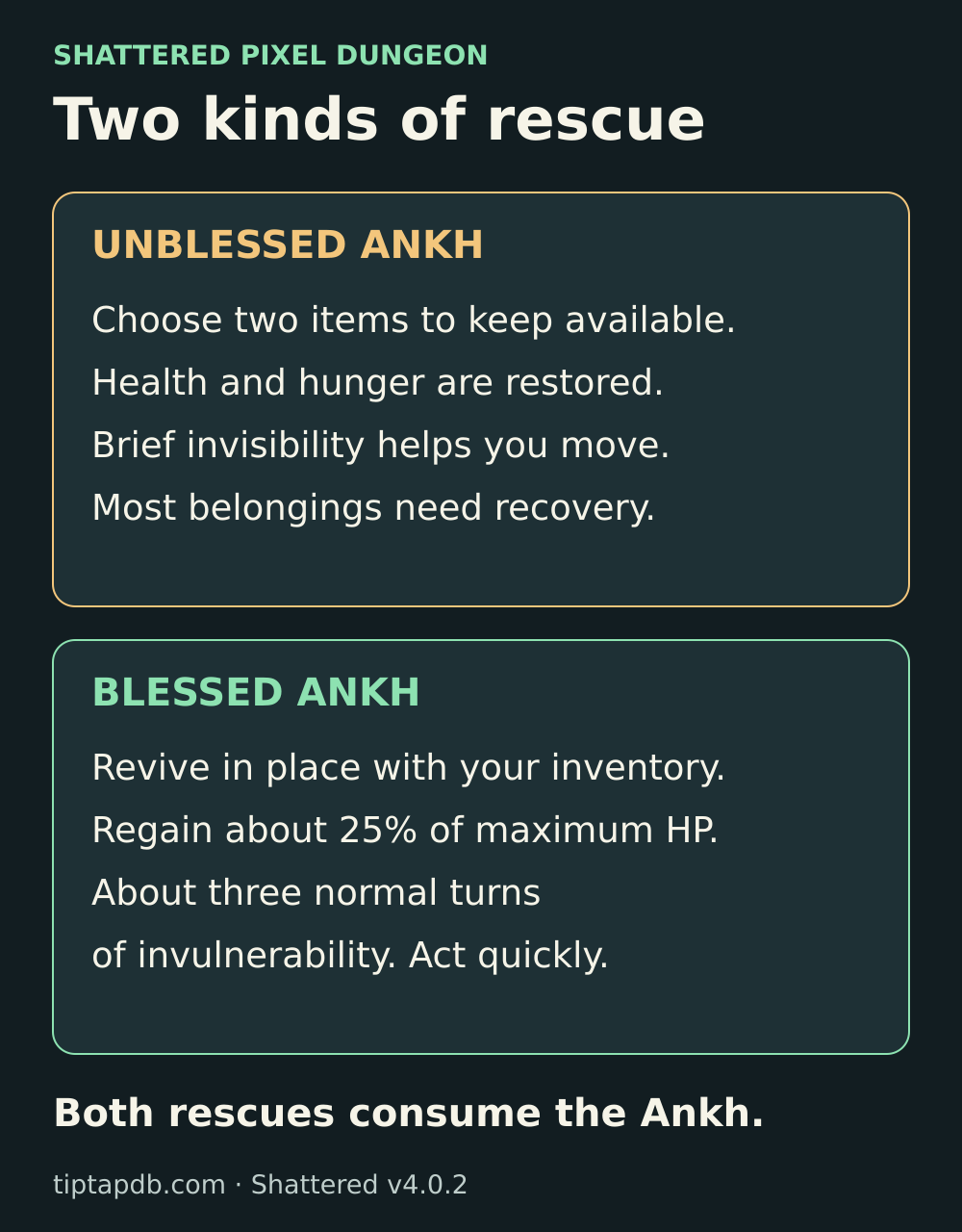
The unblessed recovery gives you health but leaves most equipment unavailable. The blessed rescue keeps your gear and gives only a short window to act.
Blessing is preparation for a future emergency. It does not retroactively recover the backpack from an Ankh you have already used.
If the backpack still seems missing
Check these before treating the save as broken:
- Wrong floor: did fatal landing damage happen one depth below the place you remember falling from?
- Reset floor: was the level locked at the time of death? Search the regenerated layout rather than the old death location.
- Item pile: inspect the tile. The current pile rules put the lost backpack ahead of ordinary loose items, so an old report about needing to clear a covering scroll is not a general fix for this version.
- Pickup not completed: check whether Lost Inventory is still active after you interact with the backpack.
- Different game or version: confirm that you are playing Shattered Pixel Dungeon, and record its installed version.
If you can reproduce a missing backpack or a failed pickup, preserve the run and report it through the official issue tracker. Include your version, platform, depth, whether the floor was locked, how you died and screenshots of the map and status. Avoid deleting the save or reinstalling simply to remove the grey icons.
Report a reproducible backpack problem
Give the game version, platform, depth, death circumstances and relevant screenshots.
Open the issue trackerThe recovery is complete when Lost Inventory disappears and your belongings work again. Until then, treat the backpack as your main objective, not an optional loot stop.
Sources and game version
These instructions follow Shattered Pixel Dungeon v4.0.2. The links below open the developer’s release notes and the official source code for the recovery rules.
Shattered Pixel Dungeon v4.0.2
The release used for this guide was published on 7 October 2026.
View the official releaseChange the two preserved items
The current selection window starts with weapon and armour, but lets you choose other eligible items.
View official source codeWhere the backpack appears
Ordinary floors retain the death location; locked floors are regenerated with a new backpack position.
View official source codeWhat collecting the backpack restores
Picking up the backpack removes Lost Inventory and restores access to your belongings.
View official source codeBless the Ankh before danger
The Bless action requires a full waterskin and empties it when used.
View official source codeBlessing at a Well of Health
An unused Well of Health can bless an unblessed Ankh thrown into it.
View official source codeHealth after a blessed rescue
The blessed Ankh restores a quarter of maximum health and is consumed when it saves the hero.
View official source codeBackpacks in ordinary item piles
The current pile logic places a lost backpack ahead of ordinary loose items.
View official source code
Latest comments
Log in to join the conversation
Log InNo comments yet. Be the first to share your thoughts!