A completed Retrain order does not always mean new soldiers joined the unit. In ROME: Total War, retraining can restore numbers, improve equipment, or do both. A settlement able to improve a unit’s weapons is not necessarily able to replace its casualties. Check the soldier count separately from the equipment icons.
This guide covers the original Imperial Campaign in Feral’s ROME: Total War mobile port, not ROME II, ROME REMASTERED or the standalone expansions. The campaign rules come from the original game; current mobile behaviour has not been play-tested. Feral’s March 2025 Imperium update changed controls and some recruitment availability, so the roster in your own campaign matters more than an old screenshot.
Start with the result you need
- Recruit: create another unit, adding soldiers and another unit card.
- Replenish through retraining: add replacements to an existing depleted unit, where the settlement can supply that unit type.
- Upgrade through retraining: improve an existing unit’s equipment. The headcount may remain unchanged.
- Merge: move surviving soldiers between compatible units of the same type. This consolidates troops; it does not create replacements.
The distinction explains an otherwise frustrating result: you pay, finish the order and still see the same number of men. If the settlement offered an equipment improvement but could not recruit that unit, the order may have done exactly what was available.
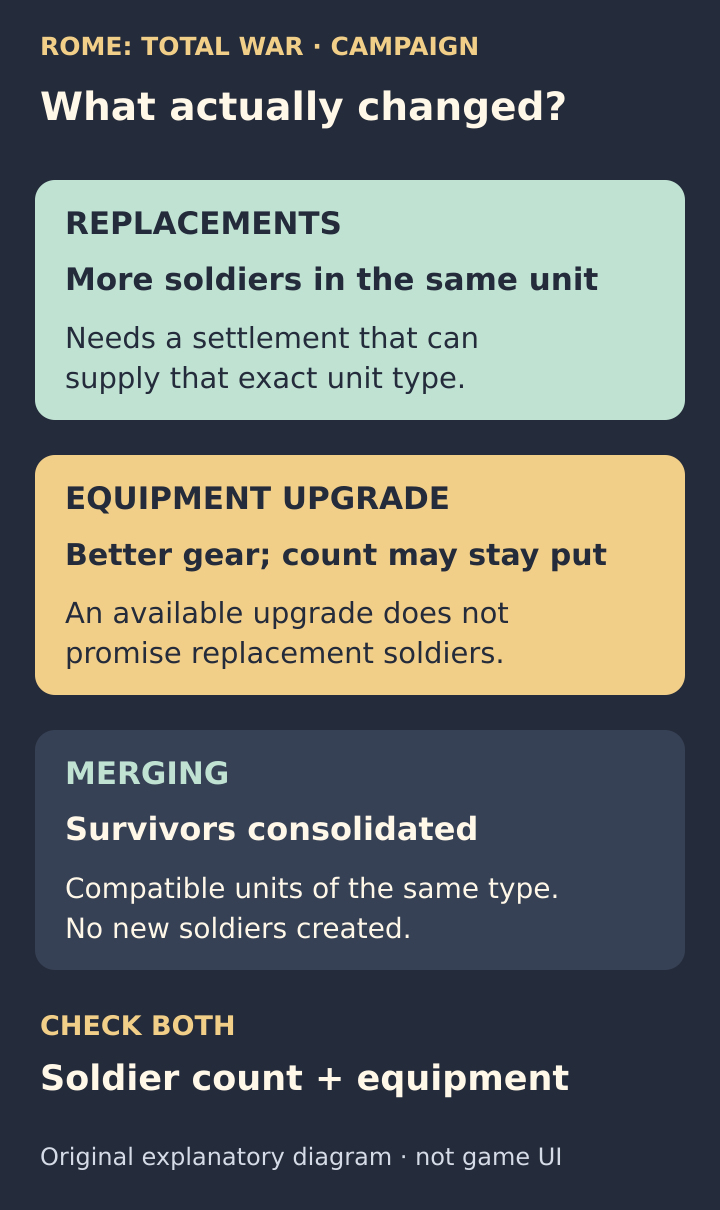
Three outcomes to check separately: more soldiers, better equipment, or fewer depleted cards. An available Retrain option is not a promise of replacements.
Check the exact unit, not just “a barracks”
Put the depleted ordinary unit inside one of your settlements, then inspect that settlement’s recruitment choices. Can it currently recruit the exact unit you want to refill? If not, investigate the required military building and its level before spending turns there.
A basic building that trains one infantry type is not proof that it supports every infantry unit. Likewise, a town equipped for infantry is not automatically a replenishment base for your cavalry. The official unit guide points to the Building Browser for the units produced by each building.
For a newly captured frontier town, this gives you a concrete choice: develop the right recruitment capability there, send the damaged unit to an established recruiting centre, or bring forward fresh troops. Choose by travel time and what you actually need for the next battle, rather than waiting beside an unsuitable building.
Building development also depends on settlement size and its government building. “Build a bigger barracks” may require a longer chain of development, not a single quick upgrade. Check the Building Browser before committing to a frontier rebuilding plan.
If the unit is recruitable, check resources and the order
Recruitment uses settlement population as well as money. A building alone does not guarantee available replacements. Check the local population, treasury, displayed requirements and training queue rather than treating every missing or unavailable option as the same problem.
Confirm that you actually queued retraining for the damaged unit and that the order completed. Queuing an order is not the same as receiving its result. After completion, compare the unit’s soldier count and equipment separately. Do not infer success solely from money being spent or a card disappearing from the queue.
For an ordinary recruited unit, simply leaving the army in friendly territory is not a substitute for the replacement process. This is especially easy to miss when coming from another Total War game. The useful question is “Can this settlement supply this unit now?”, not merely “Am I safely inside my borders?”
Why an old Roman unit can stop replenishing
The Marian reforms change Rome’s recruitment tree. If your surviving pre-reform unit is no longer recruitable, a settlement that used to support it may no longer provide replacements. Check the current roster rather than remembering what that city could train earlier.
In a January 2021 original-game discussion, a player’s missing retrain option was traced to surviving Triarii after the reforms. That is a useful warning, not a rule that every unavailable unit has the same cause. Check building requirements and resources too.
If the old type is no longer available, plan around the survivors you have: consolidate compatible depleted units or introduce newly recruited units into the army. Do not keep buying building upgrades on the assumption that they must restore the old roster.
Merging saves space, not soldiers
Imagine two units of the same type with 18 and 22 survivors. For this example, assume their normal capacity is 60 each. A merge can leave one card containing 40 soldiers. You have freed a card slot, but you still have 40 soldiers, not a fully replenished unit of 60.
With 45 and 35 survivors at that same illustrative capacity, consolidation can produce 60 and 20. The extra soldiers are not lost merely because the receiving unit becomes full. The total remains 80. These are arithmetic examples, not the size of a particular troop type.
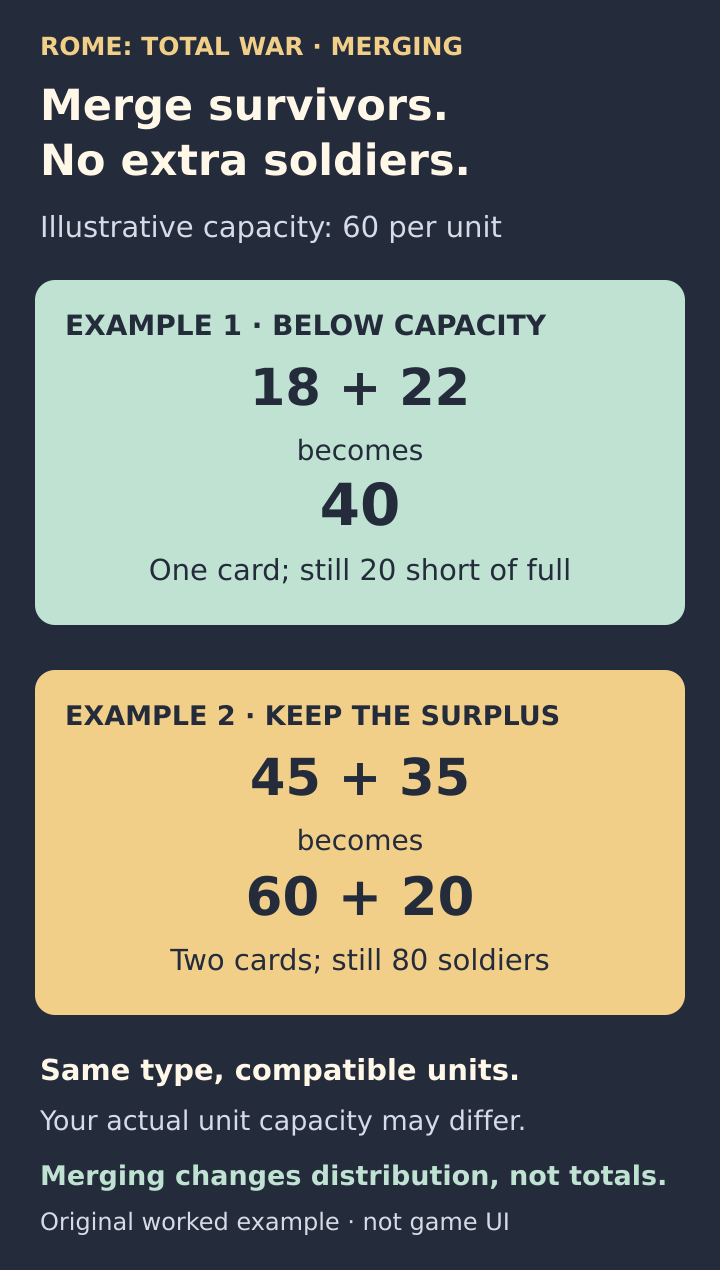
Merging conserves survivors: 18 + 22 = 40; 45 + 35 = 60 + 20 = 80. Both examples assume compatible units of the same type and an illustrative capacity of 60.
This matters because an army’s 20 unit slots can be occupied by badly depleted cards. Consolidation can make room for fresh units, but inspect valuable veterans before combining them. The original manual warns that mixing experience levels can change the resulting unit’s experience.
Two exceptions worth remembering
- Mercenaries: the original rules allow equipment upgrades through retraining, but not replacement of their missing soldiers. Do not interpret an available upgrade as permission to refill them normally.
- A general’s bodyguard: casualties recover over time. It is not an ordinary recruited unit, so its recovery does not prove that neighbouring infantry should refill automatically.
Find the mobile controls without following PC shortcuts
Feral documents an Auto-Merge Units option and an in-game manual in the mobile app’s version history. Use the app’s help for your device instead of following desktop instructions such as pressing M.
If you cannot find settlement management at all, Feral’s mobile help page includes Campaign Map and Advisor Help tutorials. Solve that navigation problem first, then apply the recruitment checks above.
Before you spend another turn
- Identify the exact unit and whether it is ordinary, mercenary or a bodyguard.
- For ordinary replacements, confirm it is inside one of your settlements that can recruit that type now.
- Check building level, population, money and the actual queued order.
- After completion, inspect headcount and equipment separately.
- If replacements are unavailable, decide whether merging or fresh troops solves your next battle’s problem.
If the order finished but the headcount stayed the same, check whether it improved equipment rather than supplied replacement soldiers.
Sources and further reading
Original game manual
Read the original game manual. Pages 21–22 explain merging and bodyguard recovery; pages 34–35 distinguish numerical retraining from equipment upgrades, including the mercenary exception.
Read the sourceOfficial Imperium update notes
Read Feral’s mobile Imperium update changelog. It documents control changes and specific recruitment fixes, which make current in-game rosters more useful than old screenshots.
Read the sourceCommunity explanation of replacement versus upgrades
Read the original-game discussion behind this distinction. Players separate replacement soldiers from upgrades and explain why a retrain option can exist without local recruitment access.
Read the sourceOfficial unit recruitment reference
Read the official unit reference for the original ROME: Total War. It explains recruitment resources and how military buildings determine the units available in a settlement.
Read the sourceOfficial settlement building reference
Read the official original-game building reference. Settlement size and government development affect which military buildings can be built and therefore which units a frontier town can support.
Read the sourceMobile recruitment and replenishment question
Read a mobile player’s recruitment question and later replies. It shows both the difficulty finding the controls and why a captured town may lack the capability to replenish a particular unit.
Read the sourceOriginal-game discussion of reform-era retraining
Read the January 2021 discussion in the original game’s Steam hub. It connects an unavailable retrain option to recruitment requirements and surviving Triarii after the Marian reforms.
Read the sourceOfficial mobile app version history
Read Feral’s mobile release history, including Auto-Merge Units and the in-game manual. Version 2.0.1 dated April 10, 2025 also lists a unit-card merging crash fix.
Read the sourceOfficial mobile tutorials
Open Feral’s mobile tutorial index, including Campaign Map and Advisor Help. Use its device-oriented help rather than translating the original PC manual’s keyboard shortcuts into touch gestures.
Read the source
Latest comments
Log in to join the conversation
Log InNo comments yet. Be the first to share your thoughts!