
A blue input zone supplies the workstation linked to it. It does not tell that workstation where to put everything it makes. If a part needs another operation, follow that part to the next machine and check that machine’s input link. If you want a place for finished products, that is the green export zone’s job.
These distinctions come from the original PC storage system, documented in 2019–2020. The current Android and iOS builds have not been play-tested for this guide; the older export-zone problems described below are not confirmed current mobile bugs.
Start with the part, not the worker
Pick one item taking an unnecessary trip. Find its place in the project’s production chain and ask: is this the final product, or has it only finished one operation? A component can be ready to leave a machine while still needing more work before the product is complete.
That distinction prevents two different fixes from getting mixed together. A component needed downstream needs sensible production storage. A finished product needs dispatch storage. Moving the green area closer to the first machine will not turn an unfinished component into an exportable product.
The same misunderstanding appeared in a July 2022 discussion about operators walking to distant storage despite available haulers. The useful starting question is what the item is now, not which worker is carrying it.
What the three zone colors actually mean
- Yellow: general storage. A flexible place for materials and products that fit. Useful for receiving goods and keeping a local buffer, but it does not separate materials by production department.
- Blue: input storage. Supplies selected workstations or a linked billboard group. Place it near the operation that needs the contents.
- Green: export storage. Stages finished products. “Finished” means the product, not merely the last operation performed at the machine you are watching.
The color roles are also set out in the community’s August 2020 mechanics guide. Shelving can increase usable storage, but choose storage that suits the actual item rather than assuming every product fits the same arrangement.
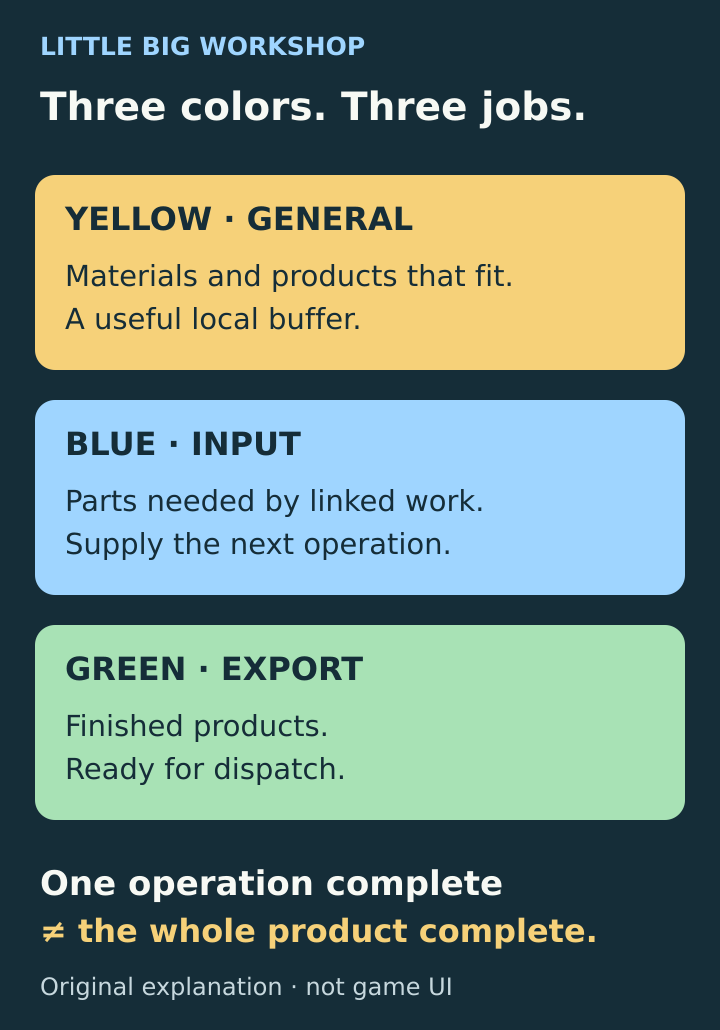
Match the zone to the item’s role. A finished operation is not necessarily a finished product.
A blue link points toward the consumer
Imagine a simple two-operation chain: machine A makes a component, then machine B uses it. This is a schematic example, not a particular recipe.
Linking a blue zone to A helps supply A. It is not an instruction to collect every component A produces. For the component needed by B, inspect the blue zone serving B. Think “what does this machine need?” rather than “where should this machine dump its output?”
This was the exact distinction behind an October 2019 request for an output zone for each worktable. After the player clarified the request, developer PollyWahn described it as the reverse of the existing workstation zone. The same reply thread confirms that export storage is unlocked through R&D and then selected in a storage zone’s settings. If only general storage is available, check the storage-type research before rebuilding the factory.
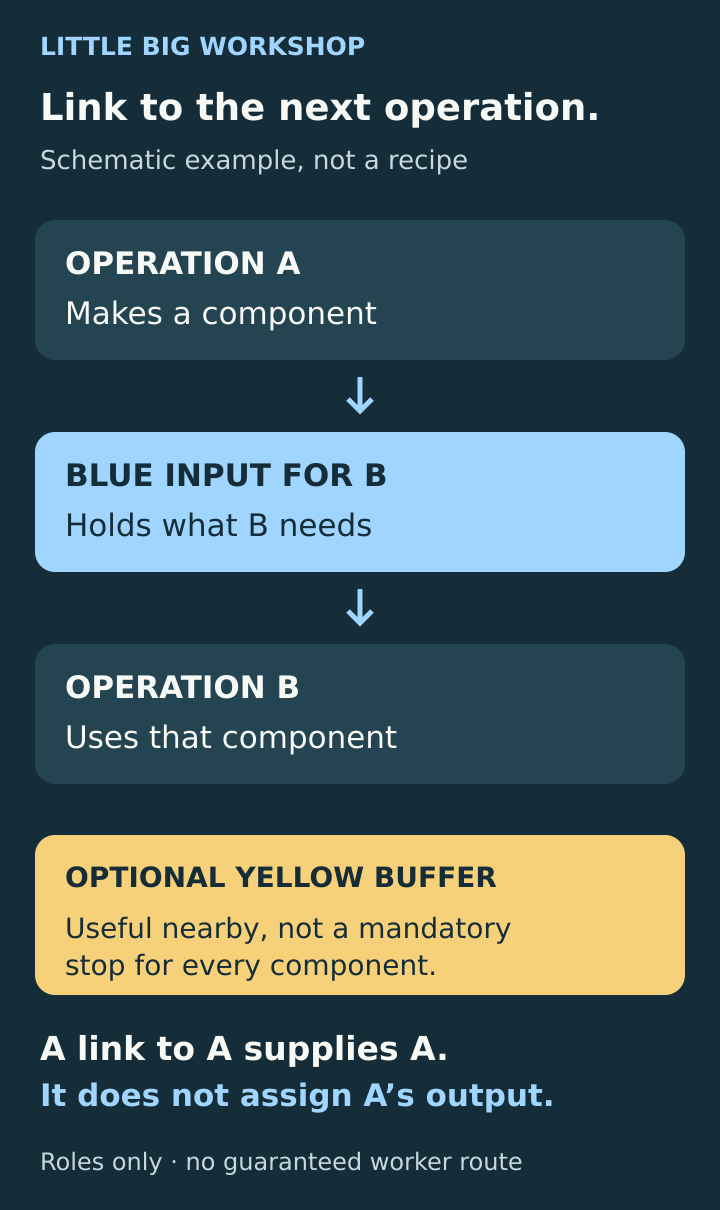
The link belongs to the operation that needs the component. The diagram shows roles, not guaranteed worker routes.
Check links after moving machines
Open the problem zone’s settings and inspect what it serves. Confirm the receiving workstation has work needing that item. If you use billboards, inspect the billboard connection too. A blue area beside the right machine is not enough if its link still points somewhere else.
Community reports from October 2020 specifically warn that moving a workstation can leave its old input-zone link intact. Review links after moving equipment or reorganizing groups instead of assuming the connection followed your intended layout.
Do not use an empty blue zone alone as proof of a bug. Check the item, the receiving operation and the connection together. This is a diagnostic check, not a promise that every future job in a queue will immediately fill its input area.
Keep a local buffer without turning it into a new bottleneck
A small yellow area near a machine cluster can give operators somewhere convenient to leave parts while hauling catches up. A blue area near the next operation gives those parts a useful destination. Keep doors and walking space clear, and leave enough usable room for the items you actually make.
Yellow is a buffer, not a compulsory stop between every pair of machines. A component can already be suitable for the next operation’s input storage. Do not redesign the factory around a rule that every output must visit yellow first.
In an October 2019 response about goods going to the wrong room, PollyWahn described the intended drop-off as the nearest valid zone, while noting that ignoring a nearer suitable empty area sounded unusual. That does not establish an exact shortest-path formula. Watch where the item actually goes after each change rather than assuming room boundaries determine the result.
Priority does not make yellow storage a material filter
Raising a general zone’s priority does not make it “wood only” or “output from machine A only.” A 2021 discussion describes goods being hauled between yellow zones after priorities changed, including materials the player wanted to keep apart. Use the right zone type and links first; tune priority afterward.
Change one zone at a time and watch a complete example: where the item arrives, where it is processed, and where it goes next. If you change every priority together, an extra trip may move elsewhere without becoming easier to diagnose.
Parts beside an idle machine may already be reserved
An item being nearby does not mean the stalled operation can use it. In the developer’s response to an October 2019 idle-worker report, apparently available parts could already be booked for another operation or project. Trace the missing ingredient through the project before hiring more haulers or enlarging every zone.
If a genuinely finished product still ignores green
First confirm the order’s product is complete, the area is really an export zone, and the item has usable space and access. If those checks pass, do not assume you misread the colors.
Players reported finished goods ignoring green storage in 2021–2022 while yellow storage worked. The reports included client products, and participants disagreed about whether size explained the problem. They do not establish that every large item fails, or that the issue persists in today’s mobile releases.
Keep sufficient general storage available and, if practical, try a small yellow fallback without scrapping the project. If the item moves there, record the result; it narrows the symptom but does not prove the cause. For a reproducible failure, note the platform, game version, product, order type and zone layout. That is more useful than repeatedly raising priority on an area the item will not use.
The shortest troubleshooting order is: identify the item → find its next operation → check the consumer’s link → check usable storage → observe one change. Only then decide whether you have a layout problem or a failure worth reporting.
Sources and further reading
Community discussion of input and export storage
Read the July 2022 player discussion about long operator walks, input areas, local buffers and the distinction between intermediate parts and finished exports.
Read the sourceCommunity guide to zone roles and production flow
Read the August 2020 community mechanics guide. Its Stations and Zones section describes the three colors, storage capacity and grouping related operations.
Read the sourceDeveloper explanation of input versus output zones
Read PollyWahn’s October 2019 replies distinguishing export storage from the requested output assignment for individual workstations, with the R&D unlock.
Read the sourceCommunity explanation of links and moved workstations
Read the October 2020 community explanation of machine and billboard links, local buffers and the old input links that can remain after moving a workstation.
Read the sourceDeveloper response about valid storage destinations
Read the October 2019 developer response describing intended nearest-valid storage behavior. Player hypotheses in the thread are not confirmed pathfinding rules.
Read the sourceCommunity reports on general-zone priority
Read the December 2021 discussion and later replies about materials moving between yellow zones after priority changes. This is community guidance, not an algorithm specification.
Read the sourceDeveloper explanation of reserved parts
Read the October 2019 developer reply explaining that nearby parts may already be booked for another operation or project, and why idling needs more diagnosis.
Read the sourceHistorical reports of finished goods refusing green zones
Read the 2021–2022 player reports of finished and client products ignoring green storage while yellow worked. They do not establish the state of current mobile builds.
Read the source
Latest comments
Log in to join the conversation
Log InNo comments yet. Be the first to share your thoughts!