If an officer opens a door or throws a flashbang and only then waits for Alpha, inspect where the Go Code is attached. A code on a nearby movement waypoint is not necessarily a hold on the door or grenade action you meant to delay.
For the original Door Kickers, the first repair is to put the code on the intended action itself. Then watch a short test run before rebuilding the rest of the mission. This guide covers the original game, not Door Kickers 2 or Action Squad.
Match the symptom to the order
- The flash happens before the signal: inspect the throw or door-action icon, not just the adjacent route point.
- The throw waits correctly, but another officer advances too soon: separate the throw’s release from the movement release.
- The officer still stands still after the signal: inspect the current order, including a separate manual Hold, and check whether time is paused.
- A long plan behaves differently after a door opens unexpectedly: recheck the affected door action before blaming the entire code sequence.
Go Codes can be attached to planned actions. KillHouse’s August 2013 Alpha 4 notes explicitly added combinations with grenade throws and door detonations. This matters because delaying movement at a route point and delaying an action are different intentions.
Attach the code to the action you want to delay
In a February 29, 2016 support answer, the original game’s Steam moderator gives two distinct instructions: put a throw’s code on the flashbang icon; for a door-and-flash action, choose flashbang from the door menu and apply the code to that action icon. A letter beside the officer’s position is not enough to establish that the throw itself is waiting.
Pause while inspecting the plan. Select the relevant action, confirm its assigned letter, and check what comes before and after it. On touch devices, use the action controls provided by your version rather than translating a desktop right-click instruction into a guessed gesture.
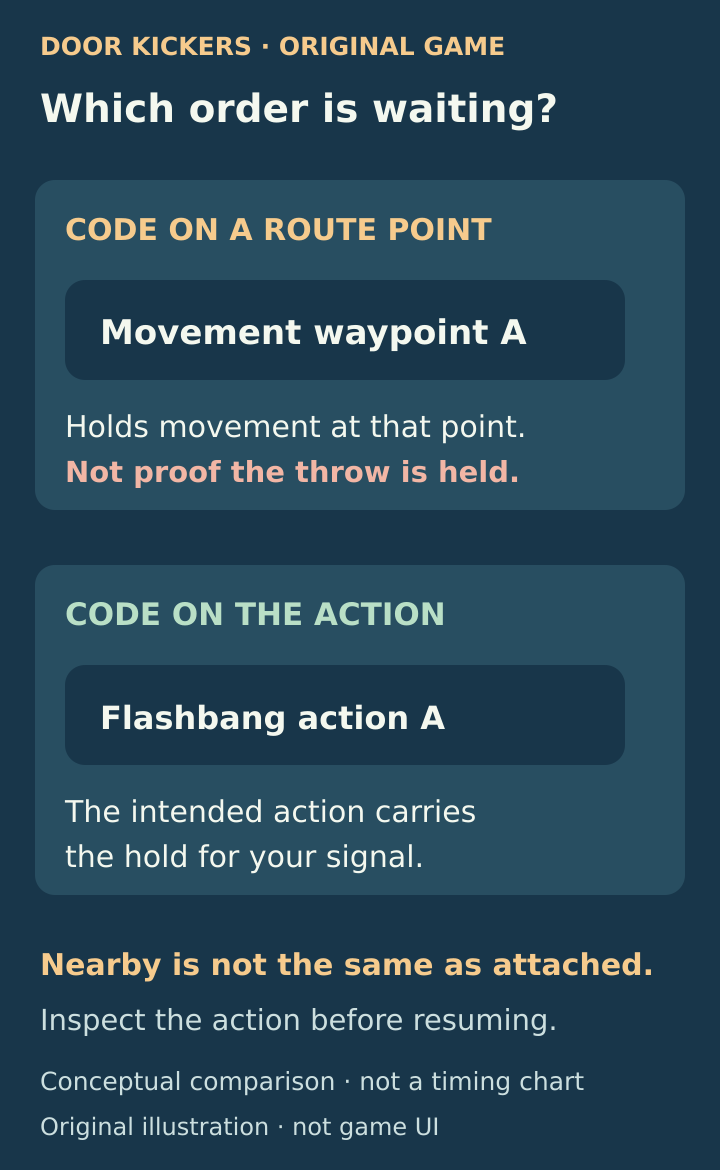
Check the object carrying the letter: the movement waypoint and the flashbang action are different places to put a hold. This is a conceptual diagram, not the game interface.
Use two separate signals when testing “flash, then move”
A shared letter coordinates the release of orders. It does not mean “finish the first officer’s action, then start the second officer’s action.” If you want to examine that distinction, build a small test with two different letters instead of a long chain of repeated Alpha orders.
For example, use Alpha on the intended throw action and Bravo on the other officer’s held advance. Let the officers reach their intended waiting points. Release Alpha, observe the throw and its result, and only then decide whether to release Bravo. The second release is yours to make; the letter B does not automatically follow A.
This is a diagnostic sequence, not a guaranteed room-clearing solution. The grenade’s effect, the doorway and visible threats still matter. Its advantage is that you can identify whether the wrong event happened before Alpha, between Alpha and Bravo, or after Bravo. That is much easier to inspect than a mission-wide cascade.
The developer describes Go Codes as a coordination tool in which the player decides when the team is ready. Their purpose is not to replace that decision with an assumption that everyone has arrived.
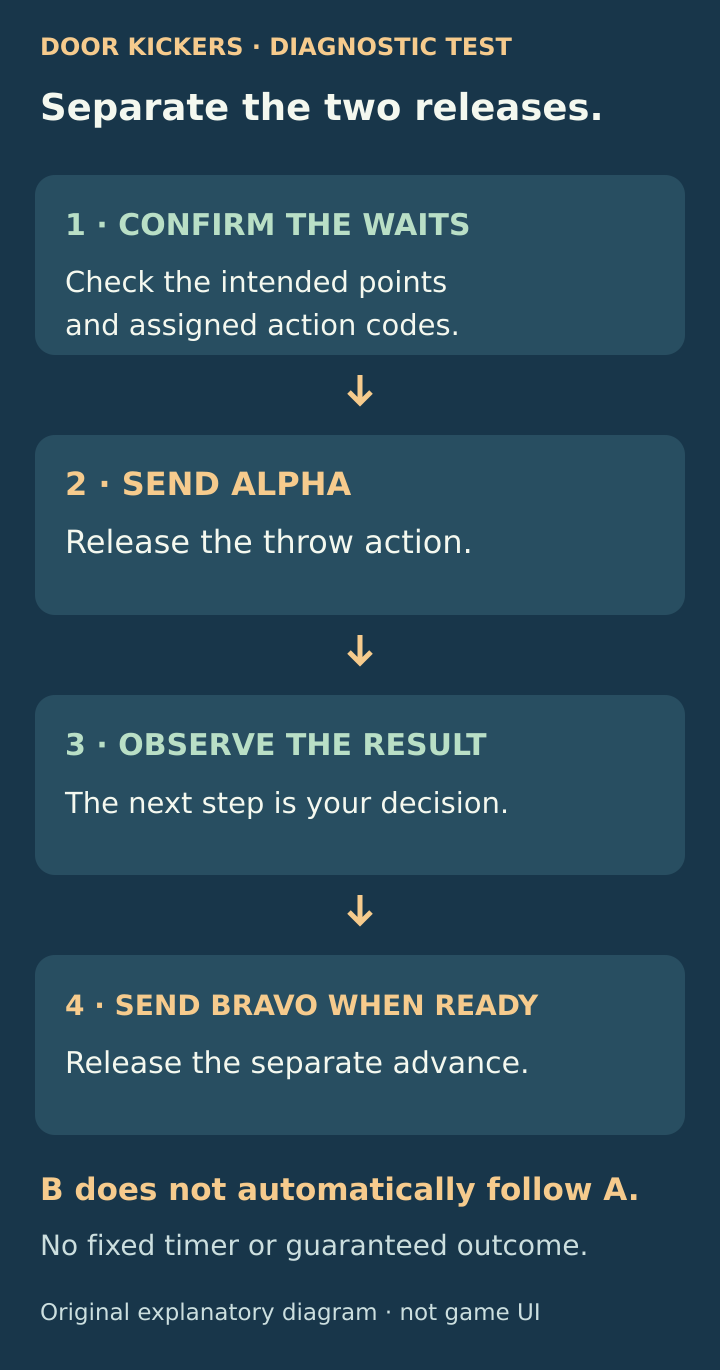
Alpha releases the throw; Bravo separately releases the held advance. The observation between them is a player decision, not an automatic timer.
Reusing a letter is supported, but simplify it while troubleshooting
The August 14, 2014 final-beta notes added support for using the same Go Code repeatedly along a path. One press should therefore not be described as permanently unlocking every later occurrence of that letter.
While troubleshooting, reserve Alpha for the throw and Bravo for the separate advance in your small test. Add another stage only after the first works. Simplifying the sequence does not mean reuse is forbidden.
A manual Hold is a separate thing to check
The same final-beta update introduced a direct Hold order on a trooper. On the desktop controls described there, clicking the trooper orders a hold and shows an orange hand; clicking again allows the route to continue.
If the expected action has happened but movement has not resumed, inspect the officer rather than repeatedly sending Alpha. Look for a separate hold or another unfinished order. Also check whether the whole game is paused. Use your mobile version’s own hold controls; the desktop click description is not a verified touchscreen instruction.
There is also Wait for Clear, a conditional order: the officer resumes after the relevant enemies are neutralized or leave their field of view. It is not the same as waiting for you to send Alpha. When diagnosing a stop, identify which kind of wait is actually present.
A changed door can change the plan
A plan drawn for a closed door may no longer be the same plan after someone opens it. The official November 27, 2014 update notes specifically say that a door flashbang waypoint is cancelled when an AI opens that door. This is a useful reason to inspect the action again when a run diverges, rather than assuming the visible route still contains every original instruction.
Do not repair that situation by adding more letters blindly. Pause an ordinary troubleshooting run, identify what action remains, and check the next intended event. If the necessary action is gone, a signal cannot restore it.
When to investigate a bug instead
Not every early action is a planning mistake. KillHouse’s November 23, 2017 desktop update explicitly fixed cases where troopers did not wait for Go Codes before acting. Old reports are therefore not a reliable description of how every current edition behaves, and the desktop fix should not be assumed to prove mobile parity.
If a correctly assigned action still fires early, collect a small reproducible example:
- Note the platform, app version and mission.
- Reduce the plan to the relevant officer and action, with a second officer only if the problem needs one.
- Use distinct letters for the events you are checking.
- Capture the planned action icon and its code before running.
- Record whether the door changed, which signal you issued and what happened next.
- Compare that simple run with the longer plan before concluding that the code system is broken.
Keep the scope clear: a successful short test confirms that sequence in your run, not every reuse pattern, mission or platform.
Mobile and version scope
The explanation above draws on the original game’s 2013–2017 developer notes and the 2016 action-placement answer. A current mobile build has not been play-tested for this guide. The Android listing describes a touch-specific interface, and its December 2025 maintenance notes include UI changes and removal of the quick-restart HUD button. Follow your edition’s controls rather than an old screenshot’s button positions.
Sources and further reading
Official support for Go Codes on actions
Read the August 6, 2013 Alpha 4 feature list. It explicitly adds Go Codes to actions such as grenade throws and door detonations, rather than limiting them to route holds.
Read the sourceOriginal-game support answer about early flashbangs
Read the moderator’s February 29, 2016 reply in the original Door Kickers forum. It distinguishes the flashbang action icon from the nearby movement point when assigning a signal.
Read the sourceDeveloper explanation of player-controlled coordination
Read the developer’s December 18, 2014 reply about deciding when the team is ready. It explains the intended coordinating role of Go Codes; neighboring player comments are not a complete sequencing specification.
Read the sourceOfficial Hold and repeated-code changes
Read the August 14, 2014 final-beta changes for the original game. They describe the desktop manual Hold and add repeated uses of the same Go Code along one path.
Read the sourceOfficial explanation of Wait for Clear
Read the June 21, 2014 beta announcement for the automatic Wait for Clear condition. It is distinct from a manual letter signal or a direct Hold on a trooper.
Read the sourceOfficial update about changed door actions
Read the November 27, 2014 update 1.03 notes. They document cancellation of a door flashbang waypoint when AI opens the door, and also record the addition of Delta.
Read the sourceOfficial fix for ignored Go Codes
Read the November 23, 2017 desktop update notes, especially the fix for troopers sometimes acting without waiting for their Go Code. Mobile behavior is not established by this desktop change alone.
Read the sourceOfficial Android edition and update notes
The official Android listing identifies the touch-specific edition and its maintenance notes, including UI placement changes and removal of the quick-restart HUD button.
Read the source
Latest comments
Log in to join the conversation
Log InNo comments yet. Be the first to share your thoughts!