If your old Brawlhalla skins appear on another device but your account level, Legend levels or Ranked Elo look wrong, check which account is earning progression. Sharing an inventory and choosing a progression account are separate decisions. Seeing a familiar skin does not prove that you selected the progress you meant to continue.
Start in Account Linking, not by unlinking your Ubisoft account. This guide is for choosing and checking the right existing account. It does not promise to recover an inaccessible account or combine two accounts from the same platform.
Sources checked on November 5, 2026. The redesigned overview was checked against the developer's published image; the Manage submenu and current platform-specific controls were not tested on a live account. This is a source-based diagnostic guide, not a tested click-by-click setup walkthrough.
Separate the three account roles
The official Cross-Progression FAQ makes the important distinction: you can share an account's inventory while earning progress on either that linked account or the platform account you are currently using.
Keep these roles separate:
- Platform Account: the account on the platform where you are playing now. Its identity determines your displayed name, friends list and Guild.
- Active Linked Account: the one other linked account whose inventory is being shared with your current platform account.
- Progression account: the account you choose to earn progress on. This includes Account XP, Legend XP, Ranked Elo, Battle Pass Missions, Gold, Glory and Stances.
You can have multiple platform accounts connected to the same Ubisoft account, but only one additional account is your Active Linked Account at a time. Connecting more accounts does not create a single merged progression record.
Example: you are playing on your phone and have selected your established console account as the Active Linked Account. Its skins can be available while you continue leveling the phone account. If your goal is to continue your console progress, the console account must also be selected for progression.
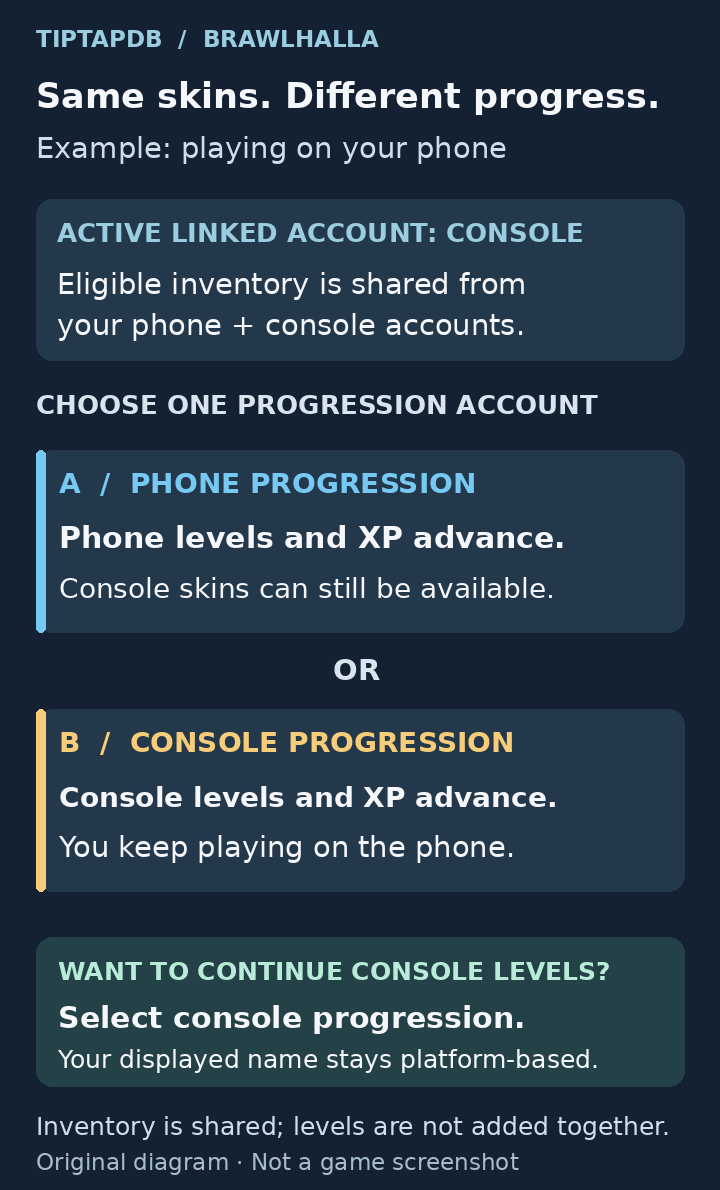
Conceptual example showing a phone and console sharing eligible inventory while progress goes to the one selected account, not both. Original explanation diagram, not a game screenshot. Inventory sharing is subject to item and account eligibility.
Use the redesigned menu, not an old button checklist
Brawlhalla redesigned the Account Linking screen in Patch 10.09. The developer's published menu image shows separate Platform Account, Active Linked Account and Other Platform Accounts sections, with Manage along the bottom.

That is why an older tutorial can tell you to find Set Up Cross Progression when your screen instead offers Manage. Do not assume the feature was removed because the button name changed.
On the device you want to play on:
- Open the game's settings/options menu and enter Account Linking.
- Check the Platform Account. Is this the platform account you intended to use on this device?
- Check the Active Linked Account. Is it the account that actually holds the skins or progress you want?
- Open Manage to review the linking setup. For continuing the other account's levels and Elo, choose that account for progression as well as making it the active linked account.
- Read the account-selection and confirmation text before accepting. The desired result is that progression goes to your intended account, not merely that the account appears in the connected list.
- Return to the game and compare a known account or Legend level with the account you meant to continue.
Follow the labels displayed in your version rather than an old keyboard shortcut. Older screens and guides use a star to mark the progression choice; the developer's redesigned overview also shows a star. The critical check is the account associated with that choice, not the presence of a star somewhere on the screen.
Do not use your displayed name as the only test. Keeping the current platform's name is expected even when you earn progress on the linked account.
If skins are present but progress is still wrong
First verify that the correct account is selected for both roles you need. It is possible to share the right inventory while still earning XP on the current platform account.
Then compare a specific value you recognize, such as a particular Legend's level. A cosmetic may be owned on both accounts, so it is a poor way to distinguish them. If you play a match that awards XP, check which selected account's progression is advancing before continuing a long session.
Do not expect your two level histories to add together. Selecting the console account to progress does not turn separate phone levels into extra console levels. Choose the history you want to continue, rather than treating linking as an account merge.
If the intended account is absent, unavailable or has an old login warning, investigate that first. Repeatedly changing the progression selection cannot select an account that the game does not currently make available.
If the account is missing or unavailable
Check the platform identity and the Ubisoft connection before making changes. The official linking instructions require each participating platform account to be connected to the same Ubisoft account. Linking only the device you are currently using is not enough.
If the old account is still accessible, launch Brawlhalla on its original platform and check that it is the account with your expected progress. Close that session before continuing on the new device: the official FAQ says the same active linked account cannot be played simultaneously on different platforms.
Back on the destination device, if Account Linking offers Refresh, use it and recheck the account list and any displayed warning. Refresh is not a substitute for signing into the correct source account.
The 30-day rule changed in 2026
Do not apply either of these blanket claims: “everyone must log in every month” or “nobody ever has to log in again.”
The current official FAQ says eligible account links do not expire, while accounts that are not eligible remain subject to the 30-day login requirement. Eligibility is determined platform by platform.
The May 2026 change also required a login on each linked platform after Brawlhalla Fest 2026 began. If the game asks for a recent login and you still have access to that platform, launch Brawlhalla itself there using the correct account. Signing into the Ubisoft website is not the same action.
The FAQ does not provide a public eligibility checklist that guarantees an exemption for your particular account. If you cannot access the required platform, record the warning and ask official support what applies to your setup. Do not buy another device or a cloud subscription on the assumption that a community workaround is guaranteed to work.
Do not unlink to replace the wrong account
Changing which already-linked account is active is different from removing a platform account from Ubisoft.
Only one account from each platform can be connected to a Ubisoft account. The official FAQ also says that unlinking normally lets you reconnect the same platform account, not substitute a different one. Its instruction for connecting a different account on that platform is to contact Ubisoft Support.
Check item ownership before treating it as lost progress
A missing item does not always mean the progression selection failed.
- Mammoth Coins and platform-exclusive items: the official Cross-Inventory rules exclude these from cross-platform sharing.
- A purchase made while using linked progression: purchases made with Mammoth Coins go to the current platform account's inventory, not automatically to the account receiving progression.
- Items disappeared after changing the Active Linked Account: the previous account's inventory is no longer being shared. The official FAQ says those items remain owned by that account; the selection did not permanently transfer them elsewhere.
Check the account that owns the item before purchasing it again. Sharing access, earning progress and owning a new purchase are three different questions.
What to send support if the checks do not resolve it
Use the support route on the official Brawlhalla support page for a game-specific problem, or the Ubisoft route above for an account-linking replacement request.
Include your Brawlhalla User ID, your current platform, the source platform, which account should receive progression, the exact warning, and what Account Linking currently shows. State whether skins are present but levels are wrong, or whether the source account is missing entirely. A screenshot can help, but send it privately through official support and omit passwords, login codes and unnecessary personal details.
Before returning to a long session, make three checks: the correct platform account is signed in, the intended other account is active, and progression is assigned to the history you want to continue.
Latest comments
Log in to join the conversation
Log InNo comments yet. Be the first to share your thoughts!